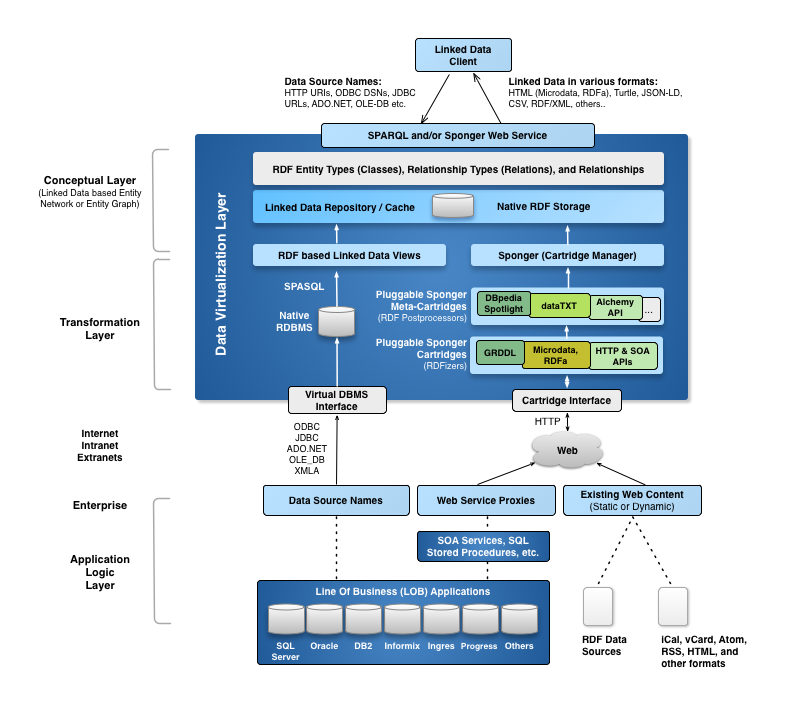
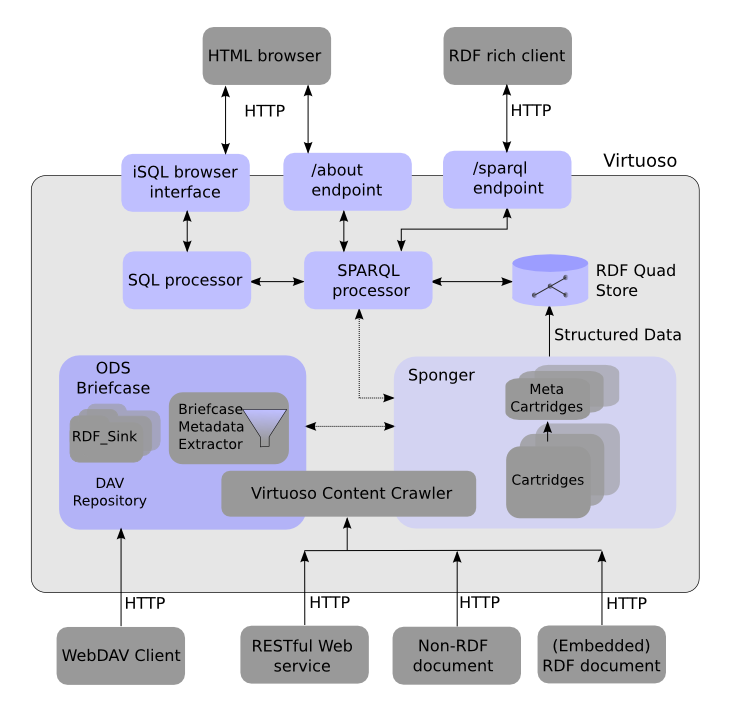
The Virtuoso Sponger is a middleware component of Virtuoso that generates RDF Linked Data from a variety of data sources. The sponger is transparently integrated into the Virtuoso SPARQL Query Processor, where it serves as part of the URI/IRI dereferencing functionality. It is also optionally used by the Virtuoso Content Crawler.
|
| Figure: 15.6.1.1. Virtuoso Sponger |
A majority of the worlds data naturally resides in non RDF form at the current time. The Sponger delivers middleware that accelerates the bootstrap of the Semantic Data Web by generating RDF from non RDF data sources, unobtrusively.
When an RDF aware client requests data from a network accessible resource via the Sponger the following events occur:
The imported data forms a local cache and its invalidation rules conform to those of traditional HTTP clients (Web Browsers). Thus, expiration time is determined based on subsequent data fetches of the same resource (note: the first data load will record the 'expires' header) with current time compared to expiration time stored in the local cache. If HTTP 'expires' header data isn't returned by the source data server, then the "Sponger" will derive it's own invalidation time frame by evaluating the 'date' header and 'last-modified' HTTP headers. Irrespective of path taken, local cache invalidation is driven by an assessment of current time relative to recorded expiration time.
Designed with a pluggable architecture, the Sponger's core functionality is provided by Catridges. Each catridge includes Data Extractors which extract data from one or more data sources, and Ontology Mappers which map the extracted data to one or more ontologies/schemas, and route to producing RDF Linked Data.
The Schema Mappers are typically XSLT (e.g. GRDDL and other OpenLink Mapping Schemes) or Virtuoso PL based. The Metadata Extractors may be developed in Virtuoso PL, C/C++, Java, or any other language that can be integrated into the Virtuoso via it's server extensions APIs.
The Sponger also includes a pluggable name resolution mechanism that enables the development of Custom Resolvers for naming schemes (e.g. URNs) associated with protocols beyond HTTP. Examples of custom resolvers include:
The Sponger is comprised of cartridges which are themselves comprised of an entity extractor and an ontology mapper. Entities extracted from non-RDF resources are used as the basis for generating structured data by mapping them to a suitable ontology. A cartridge is invoked through its cartridge hook, a Virtuoso/PL procedure entry point and binding to the cartridge's entity extractor and ontology mapper.
Basic
Sponger cartridges are invoked as follows:
When the SPARQL processor dereferences a URI, it plays the role of an HTTP user agent (client) that makes a content type specific request to an HTTP server via the HTTP request's Accept headers. The following then occurs:
Meta
Virtuoso also supports another cartridge type - a 'meta-cartridge'. Meta-cartridges act as post-processors in the cartridge pipeline, augmenting entity descriptions in an RDF graph with additional information gleaned from 'lookup' data sources and web services.
Used to extract RDF from a Web Data Source it consumes services from: Virtuoso PL, C/C++, Java based RDF Extractors
The RDF mappers provide a way to extract metadata from non-RDF documents such as HTML pages, images Office documents etc. and pass to SPARQL sponger (crawler which retrieve missing source graphs). For brevity further in this article the "RDF mapper" we simply will call "mapper".
The mappers consist of PL procedure (hook) and extractor, where extractor itself can be built using PL, C or any external language supported by Virtuoso server.
Once the mapper is developed it must be plugged into the SPARQL engine by adding a record in the table DB.DBA.SYS_RDF_MAPPERS.
If a SPARQL query instructs the SPARQL processor to retrieve target graph into local storage, then the SPARQL sponger will be invoked. If the target graph IRI represents a deferencable URL then content will be retrieved using content negotiation. The next step is the content type to be detected:
PL hook requirements:
Every PL function used to plug a mapper into SPARQL engine must have following parameters in the same order:
Note: the names of the parameters are not important, but their order and presence are!
Example Implementation:
In the example script bellow we implement a basic mapper, which maps a text/plain mime type to an imaginary ontology, which extends the class Document from FOAF with properties 'txt:UniqueWords' and 'txt:Chars', where the prefix 'txt:' we specify as 'urn:txt:v0.0:'.
use DB;
create procedure DB.DBA.RDF_LOAD_TXT_META
(
in graph_iri varchar,
in new_origin_uri varchar,
in dest varchar,
inout ret_body any,
inout aq any,
inout ps any,
inout ser_key any
)
{
declare words, chars int;
declare vtb, arr, subj, ses, str any;
declare ses any;
-- if any error we just say nothing can be done
declare exit handler for sqlstate '*'
{
return 0;
};
subj := coalesce (dest, new_origin_uri);
vtb := vt_batch ();
chars := length (ret_body);
-- using the text index procedures we get a list of words
vt_batch_feed (vtb, ret_body, 1);
arr := vt_batch_strings_array (vtb);
-- the list has 'word' and positions array, so we must divide by 2
words := length (arr) / 2;
ses := string_output ();
-- we compose a N3 literal
http (sprintf ('<%s> <http://www.w3.org/1999/02/22-rdf-syntax-ns#type> <http://xmlns.com/foaf/0.1/Document> .\n', subj), ses);
http (sprintf ('<%s> <urn:txt:v0.0:UniqueWords> "%d" .\n', subj, words), ses);
http (sprintf ('<%s> <urn:txt:v0.0:Chars> "%d" .\n', subj, chars), ses);
str := string_output_string (ses);
-- we push the N3 text into the local store
DB.DBA.TTLP (str, new_origin_uri, subj);
return 1;
};
delete from DB.DBA.SYS_RDF_MAPPERS where RM_HOOK = 'DB.DBA.RDF_LOAD_TXT_META';
insert soft DB.DBA.SYS_RDF_MAPPERS (RM_PATTERN, RM_TYPE, RM_HOOK, RM_KEY, RM_DESCRIPTION)
values ('(text/plain)', 'MIME', 'DB.DBA.RDF_LOAD_TXT_META', null, 'Text Files (demo)');
-- here we set order to some large number so don't break existing mappers
update DB.DBA.SYS_RDF_MAPPERS set RM_ID = 2000 where RM_HOOK = 'DB.DBA.RDF_LOAD_TXT_META';
To test the mapper we just use /sparql endpoint with option 'Retrieve remote RDF data for all missing source graphs' to execute:
select * from <URL-of-a-txt-file> where { ?s ?p ?o }
It is important that the SPARQL_UPDATE role to be granted to "SPARQL" account in order to allow local repository update via sponge feature.
Authentication in Sponger
To enable usage of user defined authentication, there are added more parameters to the /proxy/rdf and /sparql endpoints. So to use it, the RDF browser and iSPARQL should send following url parameters:
'login=<account name>'
get-login=<account name>
This section contains examples of Web resources which can be transformed by RDF Cartridges. It also states where additional setup for given cartrides is needed i.e. keys account names etc.
Service based:
needs: api key example: http://www.amazon.com/gp/product/0553383043
needs: account, api-key example: http://cgi.ebay.com/RARE-DAY-IN-FAIRY-LAND-ELEPHANT-FOLIO-20-FULL-COLOR_W0QQitemZ140209597189QQihZ004QQcategoryZ29223QQssPageNameZWDVWQQrdZ1QQcmdZViewItem
example: http://musicbrainz.org/release/37e955d4-a53c-45aa-a812-1b23b88dbc13.html
example: http://www.freebase.com/view/en/beta_ursae_majoris
needs: api-key, secret, persistent-session-id example: http://www.facebook.com/profile.php?id=841100003
example: http://finance.yahoo.com/q?s=AAPL
example: http://local.yahooapis.com/MapsService/V1/trafficData?appid=YahooDemo&street=701+First+Street&city=Sunnyvale&state=CA
example: https://bugzilla.mozilla.org/show_bug.cgi?id=251714
needs: unzip plugin
needs: php plugin & dbpedia extractor example: http://wikipedia.org/wiki/London
GRDDL
example: http://www.google.com/base/feeds/snippets/17891817243016304554
URN handlers
example: urn:lsid:ubio.org:namebank:12292
needs: hslookup plugin, relevant html, pdf, xml etc. mappers enabled example: doi:10.1038/35057062
example: oai:dcmi.ischool.washington.edu:article/8
The Virtuoso SPARQL engine (called for brevity just SPARQL bellow) supports IRI Dereferencing, however it understands only RDF data, that is it can retrieve only files containing RDF/XML, turtle or N3 serialized RDF data, if format is unknown it will try mapping with built-in WebDAV metadata extractor. In order to extend this feature with dereferencing web or file resources which naturally don't have RDF data (like PDF, JPEG files for example) is provided a special mechanism in SPARQL engine. This mechanism is called RDF mappers for translation of non-RDF data files to RDF.
In order to instruct the SPARQL to call a RDF mapper it needs to be registered and it will be called for a given URL or MIME type pattern. In other words, when unknown for SPARQL format is received during URL dereferencing process, it will look into a special registry (a table) to match either the MIME type or IRI using a regular expression, if match is found the mapper function will be called.
The table DB.DBA.SYS_RDF_MAPPERS is used as registry for registering RDF mappers.
create table DB.DBA.SYS_RDF_MAPPERS (
RM_ID integer identity, -- mapper ID, designate order of execution
RM_PATTERN varchar, -- a REGEX pattern to match URL or MIME type
RM_TYPE varchar default 'MIME', -- what property of the current resource to match: MIME or URL are supported at present
RM_HOOK varchar, -- fully qualified PL function name e.q. DB.DBA.MY_MAPPER_FUNCTION
RM_KEY long varchar, -- API specific key to use
RM_DESCRIPTION long varchar, -- Mapper description, free text
RM_ENABLED integer default 1, -- a flag 0 or 1 integer to include or exclude the given mapper from processing chain
primary key (RM_TYPE, RM_PATTERN))
;
The current way to register/update/unregister a mapper is just a DML statement e.g. NSERT/UPDATE/DELETE.
When SPARQL retrieves a resource with unknown content it will look in the mappers registry and will loop over every record having RM_ENABLED flag true. The sequence of look-up is based on ordering by RM_ID column. For every record it will either try matching the MIME type or URL against RM_PATTERN value and if there is match the function specified in RM_HOOK column will be called. If the function doesn't exists or signal an error the SPARQL will look at next record.
When it stops looking? It will stop if value returned by mapper function is positive or negative number, if the return is negative processing stops with meaning no RDF was supplied, if return is positive the meaning is that RDF data was extracted, if zero integer is returned then SPARQL will look for next mapper. The mapper function also can return zero if it is expected next mapper in the chain to get more RDF data.
If none of the mappers matches the signature (MIME type nor URL) the built-in WebDAV metadata extractor will be called.
The mapper function is a PL stored procedure with following signature:
THE_MAPPER_FUNCTION_NAME (
in graph_iri varchar,
in origin_uri varchar,
in destination_uri varchar,
inout content varchar,
inout async_notification_queue any,
inout ping_service any,
inout keys any
)
{
-- do processing here
-- return -1, 0 or 1 (as explained above in Execution order and processing section)
}
;
Parameters
Return value
The Virtuoso supply as a rdf_mappers_dav VAD package a cartridge for extracting RDF data from certain popular Web resources and file types. It can be installed (if not already) using VAD_INSTALL function, see the VAD chapter in documentation on how to do that.
HTTP-in-RDF
Maps the HTTP request response to HTTP Vocabulary in RDF, see http://www.w3.org/2006/http#.
This mapper is disabled by default. If it's enabled , it must be first in order of execution.
Also it always will return 0, which means any other mapper should push more data.
HTML
This mapper is composite, it looking for metadata which can specified in a HTML pages as follows:
<link rel="meta" type="application/rdf+xml"
The HTML page mapper will look for RDF data in order as listed above, it will try to extract metadata on each step and will return positive flag if any of the above step give a RDF data. In case where page URL matches some of other RDF mappers listed in registry it will return 0 so next mapper to extract more data. In order to function properly, this mapper must be executed before any other specific mappers.
Flickr URLs
This mapper extracts metadata of the Flickr images, using Flickr REST API. To function properly it must have configured key. The Flickr mapper extracts metadata using: CC license, Dublin Core, Dublin Core Metadata Terms, GeoURL, FOAF, EXIF: http://www.w3.org/2003/12/exif/ns/ ontology.
Amazon URLs
This mapper extracts metadata for Amazon articles, using Amazon REST API. It needs a Amazon API key in order to be functional.
eBay URLs
Implements eBay REST API for extracting metadata of eBay articles, it needs a key and user name to be configured in order to work.
Open Office (OO) documents
The OO documents contains metadata which can be extracted using UNZIP, so this extractor needs Virtuoso unzip plugin to be configured on the server.
Yahoo traffic data URLs
Implements transformation of the result of Yahoo traffic data to RDF.
iCal files
Transform iCal files to RDF as per http://www.w3.org/2002/12/cal/ical# .
Binary content, PDF, PowerPoint
The unknown binary content, PDF and MS PowerPoint files can be transformed to RDF using Aperture framework (http://aperture.sourceforge.net/). This mapper needs Virtuoso with Java hosting support, Aperture framework and MetaExtractor.class installed on the host system in order to work.
The Aperture framework & MetaExtractor.class must be installed on the system before to install the RDF mappers package. If the package is already installed, then to activate this mapper you can just re-install the VAD.
Setting-up Virtuoso with Java hosting to run Aperture framework
JavaClasspath = lib/sesame-2.0-alpha-3.jar:lib/openrdf-util-crazy-debug.jar:lib/htmlparser-1.6.jar:lib/activation-1.0.2-upd2.jar:lib/bcmail-jdk14-132.jar:lib/poi-scratchpad-3.0-alpha2-20060616.jar:lib/openrdf-model-2.0-alpha-3.jar:lib/jacob-1.10-pre4.jar:lib/bcprov-jdk14-132.jar:lib/demork-2.0.jar:lib/commons-codec.jar:lib/fontbox-0.1.0-dev.jar:lib/pdfbox-0.7.3.jar:lib/applewrapper-0.1.jar:lib/junit-3.8.1.jar:lib/winlaf-0.5.1.jar:lib/aperture-test-2006.1-alpha-3.jar:lib/openrdf-util-fixed-locking.jar:lib/commons-logging-1.1.jar:lib/mail-1.4.jar:lib/aperture-2006.1-alpha-3.jar:lib/poi-3.0-alpha2-20060616.jar:lib/ical4j-cvs20061019.jar:lib/openrdf-util-2.0-alpha-3.jar:lib/rio-2.0-alpha-3.jar:lib/poi-contrib-3.0-alpha2-20060616.jar:lib/aperture-examples-2006.1-alpha-3.jar:.
SQL> DB.DBA.import_jar (NULL, 'MetaExtractor', 1);
Done. -- 466 msec.
SQL> select "MetaExtractor"().getMetaFromFile ('some_pdf_in_server_working_dir.pdf', 5);
... some RDF must be returned ...
Important: the above is verified to work with aperture-2006.1-alpha-3 on Linux system. For different version of Aperture of operation system this may need some adjustments e.g. to re-build MetaExtractor.class & changes to CLASSPATH etc.
Examples & tutorials
How to write own RDF mapper? Look at Virtuoso tutorial on this subject http://demo.openlinksw.com/tutorial/rdf/rd_s_1/rd_s_1.vsp .
Sponger functionality is also exposed via Virtuoso's "/proxy/rdf/" endpoint, as an in-built REST style Web service available in any Virtuoso standard installation. This web service takes a target URL and either returns the content "as is" or tries to transform (by sponging) to RDF. Thus, the proxy service can be used as a 'pipe' for RDF browsers to browse non-RDF sources.
For more information see RDF Sponger Proxy service
To clear cache on all values of HS_LOCAL_IRI of the SYS_HTTP_SPONGE table use: sparql clear graph <A-Named-Graph>;
The Sponger forms part of the extensible RDF framework built into Virtuoso Universal Server. A key component of the Sponger's pluggable architecture is its support for Sponger Cartridges, which themselves are comprised of an Entity Extractor and an Ontology Mapper. Virtuoso bundles numerous pre-written cartridges for RDF data extraction from a wide range of data sources. However, developers are free to develop their own custom cartridges. This programmer's guide describes how.
The guide is a companion to the Virtuoso Sponger whitepaper. The latter describes the Sponger in depth, its architecture, configuration, use and integration with other Virtuoso facilities such as the Open Data Services (ODS) application framework. This guide focuses solely on custom cartridge development.
The "Sponger" is an example of a new class of tools for converting non-RDF data into RDF. Such tools are known as RDFizers. Introduced in Virtuoso Universal Server 5.0, the Sponger is packaged in an easily extensible framework, with tight integration to the Virtuoso RDF Quad Store.
The Sponger provides built-in RDF middleware for transforming non-RDF data into RDF "on the fly". Its goal is to use non-RDF Web data sources as input, e.g. (X)HTML Web Pages, (X)HTML Web pages hosting microformats, and even Web services such as those from Google, Del.icio.us, Flickr etc., and create RDF as output. The implication of this facility is that you can use non-RDF data sources as Semantic Web data sources.
How is it used?
The Sponger can be invoked via the following mechanisms:
File metadata extraction by ODS-Briefcase details you can find at the Virtuoso Sponger whitepaper.
SPARQL Query Processor IRI Dereferencing
The Sponger is transparently integrated into the Virtuoso SPARQL query processor, where it supports IRI dereferencing.
Given the distributed nature of RDF data, it is quite possible when executing a SPARQL query that some of the referenced data resides outside the local quad store. To cope with this scenario, the Virtuoso SPARQL query processor can be instructed to retrieve the external data and cache it in local quad storage. This feature is exposed through a set of Virtuoso SPARQL extensions known as "IRI dereferencing". Essentially these enable downloading and local storage of selected triples either from one or more named graphs or based on a proximity search from a starting URI for entities matching the select criteria and also related by the specified predicates, up to a given depth. Because the SPARQL processor understands only RDF data (serialized as RDF/XML, Turtle, N3), it utilizes the Sponger RDF mapper functionality when dereferencing web or file resources which don't naturally contain RDF data.
RDF Proxy Service
The Sponger's functionality is also exposed via an in-built REST style Web service. This web service takes a target URL and either returns the content "as is" or tries to transform (by sponging) to RDF. Thus, the proxy service can be used as a 'pipe' for RDF browsers to browse non-RDF sources.
When the rdf_mappers package is installed, Virtuoso reserves the path '/about/[rdf|html]/' for RDF proxy service. For example, if a Virtuoso installation on host example.com listens for HTTP requests on port 8080 then client applications should use a 'service endpoint' string equal to 'http://example.com:8080/about/[rdf|html]/'. If the rdf_mappers package is not installed, then the service uses the path '/proxy/rdf/'.
Note: The old RDF proxy service pattern '/proxy/' is now deprecated.
Example:
The following URLs return information about musician John Cale, gleaned from the MusicBrainz music metadatabase, rendered as RDF or HTML respectively. (The sponged data is available in the HTML rendering through the foaf:primaryTopic property.)
For configuring CURIEs used by the Sponger which is exposed via sponger clients such as "description.vsp" - the VSP based information resource description utility, you can use the xml_set_ns_decl function.
Here is sample example to add curie pattern:
-- Example link: http://linkeddata.uriburner.com/about/rdf/http://twitter.com/guykawasaki/status/1144945513#this
XML_SET_NS_DECL ('uriburner',
'http://linkeddata.uriburner.com/about/rdf/http://',
2);
The Sponger is comprised of cartridges which are themselves comprised of an entity extractor and an ontology mapper. Entities extracted from non-RDF resources are used as the basis for generating structured data by mapping them to a suitable ontology. A cartridge is invoked through its cartridge hook, a Virtuoso/PL procedure entry point and binding to the cartridge's entity extractor and ontology mapper.
Entity Extractor
When an RDF aware client requests data from a network accessible resource via the Sponger the following events occur:
Extraction Pipeline
Depending on the file or format type detected at ingest, the Sponger applies the appropriate entity extractor. Detection occurs at the time of content negotiation instigated by the retrieval user agent. The normal extraction pipeline processing is as follows:
Ontology Mapper
Sponger ontology mappers peform the the task of generating RDF instance data from extracted entities (non-RDF) using ontologies associated with a given data source type. They are typically XSLT (using GRDDL or an in-built Virtuoso mapping scheme) or Virtuoso/PL based. Virtuoso comes preconfigured with a large range of ontology mappers contained in one or more Sponger cartridges.
Cartridge Registry
To be recognized by the SPARQL engine, a Sponger cartridge must be registered in the Cartridge Registry by adding a record to the table DB.DBA.SYS_RDF_MAPPERS, either manually via DML, or more easily through Conductor, Virtuoso's browser-based administration console, which provides a UI for adding your own cartridges. (Sponger configuration using Conductor is described in detail later.) The SYS_RDF_MAPPERS table definition is as follows:
create table "DB"."DBA"."SYS_RDF_MAPPERS"
(
"RM_ID" INTEGER IDENTITY, -- cartridge ID. Determines the order of the cartridge's invocation in the Sponger processing chain
"RM_PATTERN" VARCHAR, -- a REGEX pattern to match the resource URL or MIME type
"RM_TYPE" VARCHAR, -- which property of the current resource to match: "MIME" or "URL"
"RM_HOOK" VARCHAR, -- fully qualified Virtuoso/PL function name
"RM_KEY" LONG VARCHAR, -- API specific key to use
"RM_DESCRIPTION" LONG VARCHAR, -- cartridge description (free text)
"RM_ENABLED" INTEGER, -- a 0 or 1 integer flag to exclude or include the cartridge from the Sponger processing chain
"RM_OPTIONS" ANY, -- cartridge specific options
"RM_PID" INTEGER IDENTITY,
PRIMARY KEY ("RM_PATTERN", "RM_TYPE")
);
The Virtuoso SPARQL processor supports IRI dereferencing via the Sponger. If a SPARQL query references non-default graph URIs, the Sponger goes out (via HTTP) to sponge the data source URIs and inserts the extracted RDF data into the local RDF quad store. The Sponger invokes the appropriate cartridge for the data source type to produce RDF instance data. If none of the registered cartridges are capable of handling the received content type, the Sponger will attempt to obtain RDF instance data via the in-built WebDAV metadata extractor.
Sponger cartridges are invoked as follows:
When the SPARQL processor dereferences a URI, it plays the role of an HTTP user agent (client) that makes a content type specific request to an HTTP server via the HTTP request's Accept headers. The following then occurs:
Meta-Cartridges
The above describes the RDF generation process for 'primary' Sponger cartridges. Virtuoso also supports another cartridge type - a 'meta-cartridge'. Meta-cartridges act as post-processors in the cartridge pipeline, augmenting entity descriptions in an RDF graph with additional information gleaned from 'lookup' data sources and web services. Meta-cartridges are described in more detail in a later section.
|
| Figure: 15.6.7.1.3.1. Meta-Cartridges |
Virtuoso supplies a number of prewritten cartridges for extracting RDF data from a variety of popular Web resources and file types. The cartridges are bundled as part of the rdf_mappers VAD (Virtuoso Application Distribution). Appendix B of the Virtuoso Sponger whitepaper briefly outlines the cartridges contained in the VAD.
To see which cartridges are available, look at the 'RDF Cartridges' screen in Conductor. This can be reached through the 'RDF' > 'RDF Cartridges' tabbed menu items.
|
| Figure: 15.6.7.2.1.1. RDF Cartridges |
To check which version of the rdf_mappers VAD is installed, or to upgrade it, refer to Conductor's 'VAD Packages' screen, reachable through the 'System Admin' > 'Packages' menu items.
The latest VADs for the closed source releases of Virtuoso can be downloaded from the downloads area on the OpenLink website. Select either the 'DBMS (WebDAV) Hosted' or 'File System Hosted' product format from the 'Distributed Collaborative Applications' section, depending on whether you want the Virtuoso application to use WebDAV or native filesystem storage. VADs for Virtuoso Open Source edition (VOS) are available for download from the VOS Wiki.
For developers wanting example cartridge code, the most authoritative reference is the rdf_mappers VAD source code itself. This is included as part of the VOS distribution. After downloading and unpacking the sources, the script used to create the cartridges, and the associated stylesheets can be found in:
Alternatively, you can look at the actual cartridge implementations installed in your Virtuoso instance by inspecting the cartridge hook function used by a particular cartridge. This is easily identified from the 'Cartridge name' field of Conductor's 'RDF Cartridges' screen, after selecting the cartridge of interest. The hook function code can be viewed from the 'Schema Objects' screen under the 'Database' menu, by locating the function in the 'DB' > 'Procedures' folder. Stylesheets used by the cartridges are installed in the WebDAV folder DAV/VAD/rdf_mappers/xslt. This can be explored using Conductor's WebDAV interface. The actual rdf_mappers.sql file installed with your system can also be found in the DAV/VAD/rdf_mappers folder.
Virtuoso comes well supplied with a variety of Sponger cartridges and GRDDL filters. When then is it necessary to write your own cartridge?
In the main, writing a new cartridge should only be necessary to generate RDF from a REST-style Web service not supported by an existing cartridge, or to customize the output from an existing cartridge to your own requirements. Apart from these circumstances, the existing Sponger infrastructure should meet most of your needs. This is particularly the case for document resources.
We use the term document resource to identify content which is not being returned from a Web service. Normally it can broadly be conceived as some form of document, be it a text based entity or some form of file, for instance an image file.
In these cases, the document either contains RDF, which can be extracted directly, or it holds metadata in a supported format which can be transformed to RDF using an existing filter.
The following cases should all be covered by the existing Sponger cartridges:
GRDDL (Gleaning Resource Descriptions from Dialects of Languages) is mechanism for deriving RDF data from XML documents and in particular XHTML pages. Document authors may associate transformation algorithms, typically expressed in XSLT, with their documents to transform embedded metadata into RDF.
The rdf_mappers VAD installs a number of GRDDL filters for transforming popular microformats (such as RDFa, eRDF or hCalendar) into RDF. The available filters can be viewed, or configured, in Conductor's 'GRDDL Filters for XHTML' screen. Navigate to the 'RDF Cartridges' screen using the 'RDF' > 'RDF Cartridges' menu items, then select the 'GRDDL Mappings' tab to display the 'GRDDL Filters for XHTML' screen. GRDDL filters are held in the WebDAV folder /DAV/VAD/rdf_cartridges/xslt/ alongside other XSLT templates. The Conductor interface allows you to add new GRDDL filters should you so wish.
For an introduction to GRDDL, try the GRDDL Primer. To underline GRDDL's utility, the primer includes an example of transforming Excel spreadsheet data, saved as XML, into RDF.
A comprehensive list of stylesheets for transforming HTML and non-HTML XML dialects is maintained on the ESW Wiki. The list covers a range of microformats, syndication formats and feedlists.
To see which Web Services are already catered for, view the list of cartridges in Conductor's 'RDF Cartridges' screen.
The Sponger is fully extensible by virtue of its pluggable cartridge architecture. New data formats can be sponged by creating new cartridges. While OpenLink is active in adding cartridges for new data sources, you are free to develop your own custom cartridges. Entity extractors can be built using Virtuoso PL, C/C++, Java or any other external language supported by Virtuoso's Server Extension API. Of course, Virtuoso's own entity extractors are written in Virtuoso PL.
Cartridge Hook Function
Every Virtuoso PL hook function used to plug a custom Sponger cartridge into the Virtuoso SPARQL engine must have a parameter list with the following parameters (the names of the parameters are not important, but their order and presence are):
Return Value
If the hook procedure returns zero the next cartridge will be tried. If the result is negative the sponging process stops, instructing the SPARQL engine that nothing was retrieved. If the result is positive the process stops, this time instructing the SPARQL engine that RDF data was successfully retrieved.
If your cartridge should need to test whether other cartridges are configured to handle a particular data source, the following extract taken from the RDF_LOAD_CALAIS hook procedure illustrates how you might do this:
if (xd is not null)
{
-- Sponging successful. Load sponged data in Virtuoso quad store
DB.DBA.RM_RDF_LOAD_RDFXML (xd, new_origin_uri, coalesce (dest, graph_iri));
flag := 1;
}
declare ord any;
ord := (select RM_ID from DB.DBA.SYS_RDF_MAPPERS where
RM_HOOK = 'DB.DBA.RDF_LOAD_CALAIS');
for select RM_PATTERN from DB.DBA.SYS_RDF_MAPPERS where
RM_ID > ord and RM_TYPE = 'URL' and RM_ENABLED = 1 order by RM_ID do
{
if (regexp_match (RM_PATTERN, new_origin_uri) is not null)
-- try next candidate cartridge
flag := 0;
}
return flag;
Specifying the Target Graph
Two cartridge hook function parameters contain graph IRIs, graph_iri and dest. graph_iri identifies an input graph being crawled. dest holds the IRI specified in any input:grab-destination pragma defined to control the SPARQL processor's IRI dereferencing. The pragma overrides the default behaviour and forces all retrieved triples to be stored in a single graph, irrespective of their graph of origin.
So, under some circumstances depending on how the Sponger has been invoked and whether it is being used to crawl an existing RDF graph, or derive RDF data from a non-RDF data source, dest may be null.
Consequently, when loading sponged RDF data into the quad store, cartridges typically specify the graph to receive the data using the coalesce function which returns the first non-null parameter. e.g.
DB.DBA.RDF_LOAD_RDFXML (xd, new_origin_uri, coalesce (dest, graph_iri));
Here xd is an RDF/XML string holding the sponged RDF.
Specifying & Retrieving Cartridge Specific Options
The hook function prototype allows cartridge specific data to be passed to a cartridge through the RM_OPTIONS parameter, a Virtuoso/PL vector which acts as a heterogeneous array.
In the following example, two options are passed, 'add-html-meta' and 'get-feeds' with both values set to 'no'.
insert soft DB.DBA.SYS_RDF_MAPPERS (
RM_PATTERN, RM_TYPE, RM_HOOK, RM_KEY, RM_DESCRIPTION, RM_OPTIONS
)
values (
'(text/html)|(text/xml)|(application/xml)|(application/rdf.xml)',
'MIME', 'DB.DBA.RDF_LOAD_HTML_RESPONSE', null, 'xHTML',
vector ('add-html-meta', 'no', 'get-feeds', 'no')
);
The RM_OPTIONS vector can be handled as an array of key-value pairs using the get_keyword function. get_keyword performs a case sensitive search for the given keyword at every even index of the given array. It returns the element following the keyword, i.e. the keyword value.
Using get_keyword, any options passed to the cartridge can be retrieved using an approach similar to that below:
create procedure DB.DBA.RDF_LOAD_HTML_RESPONSE (
in graph_iri varchar, in new_origin_uri varchar, in dest varchar,
inout ret_body any, inout aq any, inout ps any, inout _key any,
inout opts any )
{
declare get_feeds, add_html_meta;
...
get_feeds := add_html_meta := 0;
if (isarray (opts) and 0 = mod (length(opts), 2))
{
if (get_keyword ('get-feeds', opts) = 'yes')
get_feeds := 1;
if (get_keyword ('add-html-meta', opts) = 'yes')
add_html_meta := 1;
}
...
API Keys
Certain web services require applications to provide an API key to use the service. Flickr is one such service. Developers must register to obtain a key. See for instance http://developer.yahoo.com/flickr/. In order to cater for services which require an application key, the Cartridge Registry SYS_RDF_MAPPERS table includes an RM_KEY column to store any key required for a particular service. This value is passed to the service's cartridge through the _key parameter of the cartridge hook function.
Alternatively a cartridge can store a key value in the virtuoso.ini configuration file and retrieve it in the hook function.
The next example shows an extract from the Flickr cartridge hook function DB.DBA.RDF_LOAD_FLICKR_IMG and the use of an API key. Also, commented out, is a call to cfg_item_value() which illustrates how the API key could instead be stored and retrieved from the SPARQL section of the virtuoso.ini file.
create procedure DB.DBA.RDF_LOAD_FLICKR_IMG (
in graph_iri varchar, in new_origin_uri varchar, in dest varchar,
inout _ret_body any, inout aq any, inout ps any, inout _key any,
inout opts any )
{
declare xd, xt, url, tmp, api_key, img_id, hdr, exif any;
declare exit handler for sqlstate '*'
{
return 0;
};
tmp := sprintf_inverse (new_origin_uri,
'http://farm%s.static.flickr.com/%s/%s_%s.%s', 0);
img_id := tmp[2];
api_key := _key;
--cfg_item_value (virtuoso_ini_path (), 'SPARQL', 'FlickrAPIkey');
if (tmp is null or length (tmp) <> 5 or not isstring (api_key))
return 0;
url := sprintf('http://api.flickr.com/services/rest/?method=flickr.photos.getInfo&photo_id=%s&api_key=%s',img_id, api_key);
tmp := http_get (url, hdr);
XSLT - The Fulchrum
XSLT is the fulchrum of all OpenLink supplied cartridges. It provides the most convenient means of converting structured data extracted from web content by a cartridge's Entity Extractor into RDF.
Virtuoso's XML Infrastructure & Tools
Virtuoso's XML support and XSLT support are covered in detail in the on-line documentation. Virtuoso includes a highly capable XML parser and supports XPath, XQuery, XSLT and XML Schema validation.
Virtuoso supports extraction of XML documents from SQL datasets. A SQL long varchar, long xml or xmltype column in a database table can contain XML data as text or in a binary serialized format. A string representing a well-formed XML entity can be converted into an entity object representing the root node.
While Sponger cartridges will not normally concern themselves with handling XML extracted from SQL data, the ability to convert a string into an in-memory XML document is used extensively. The function xtree_doc(string) converts a string into such a document and returns a reference to the document's root. This document together with an appropriate stylesheet forms the input for the transformation of the extracted entities to RDF using XSLT. The input string to xtree_doc generally contains structured content derived from a web service.
Virtuoso XSLT Support
Virtuoso implements XSLT 1.0 transformations as SQL callable functions. The xslt() Virtuoso/PL function applies a given stylesheet to a given source XML document and returns the transformed document. Virtuoso provides a way to extend the abilities of the XSLT processor by creating user defined XPath functions. The functions xpf_extension() and xpf_extension_remove() allow addition and removal of XPath extension functions.
General Cartridge Pipeline
The broad pipeline outlined here reflects the steps common to most cartridges:
The MusicBrainz cartridge typifies this approach. MusicBrainz is a community music metadatabase which captures information about artists, their recorded works, and the relationships between them. Artists always have a unique ID, so the URL http://musicbrainz.org/artist/4d5447d7-c61c-4120-ba1b-d7f471d385b9.html takes you directly to entries for John Lennon.
If you were to look at this page in your browser, you would see that the information about the artist contains no RDF data. However, the cartridge is configured to intercept requests to URLs of the form http://musicbrainz.org/([^/]*)/([^.]*) and redirect to the cartridge to sponge all the available information on the given artist, release, track or label.
The cartridge extracts entities by redirecting to the MusicBrainz XML Web Service using as the basis for the initial query the item ID, e.g. an artist or label ID, extracted from the original URL. Stripped to its essentials, the core of the cartridge is:
webservice_uri := sprintf ('http://musicbrainz.org/ws/1/%s/%s?type=xml&inc=%U',
kind, id, inc);
content := RDF_HTTP_URL_GET (webservice_uri, '', hdr, 'GET', 'Accept: */*');
xt := xtree_doc (content);
...
xd := DB.DBA.RDF_MAPPER_XSLT (registry_get ('_rdf_mappers_path_') || 'xslt/mbz2rdf.xsl', xt);
...
xd := serialize_to_UTF8_xml (xd);
DB.DBA.RM_RDF_LOAD_RDFXML (xd, new_origin_uri, coalesce (dest, graph_iri));
In the above outline, RDF_HTTP_URL_GET sends a query to the MusicBrainz web service, using query parameters appropriate for the original request, and retrieves the response using HTTP GET.
The returned XML is parsed into an in-memory parse tree by xtree_doc. Virtuoso/PL function RDF_MAPPER_XSLT is a simple wrapper around the function xslt which sets the current user to dba before returning an XML document transformed by an XSLT stylesheet, in this case mbz2rdf.xsl. Function serialize_to_UTF8_xml changes the character set of the in-memory XML document to UTF8. Finally, RM_RDF_LOAD_RDFXML is a wrapper around RDF_LOAD_RDFXML which parses the content of an RDF/XML string into a sequence of RDF triples and loads them into the quad store. XSLT stylesheets are usually held in the DAV/VAD/rdf_mappers/xslt folder of Virtuoso's WebDAV store. registry_get('rdf_mappers_path') returns the RDF Mappers VAD path, 'DAV/VAD/rdf_mappers', from the Virtuoso registry.
Error Handling with Exit Handlers
Virtuoso condition handlers determine the behaviour of a Virtuoso/PL procedure when a condition occurs. You can declare one or more condition handlers in a Virtuoso/PL procedure for general SQL conditions or specific SQLSTATE values. If a statement in your procedure raises an SQLEXCEPTION condition and you declared a handler for the specific SQLSTATE or SQLEXCEPTION condition the server passes control to that handler. If a statement in your Virtuoso/PL procedure raises an SQLEXCEPTION condition, and you have not declared a handler for the specific SQLSTATE or the SQLEXCEPTION condition, the server passes the exception to the calling procedure (if any). If the procedure call is at the top-level, then the exception is signaled to the calling client.
A number of different condition handler types can be declared (see the Virtuoso reference documentation for more details.) Of these, exit handlers are probably all you will need. An example is shown below which handles any SQLSTATE. Commented out is a debug statement which outputs the message describing the SQLSTATE.
create procedure DB.DBA.RDF_LOAD_SOCIALGRAPH (in graph_iri varchar, ...)
{
declare qr, path, hdr any;
...
declare exit handler for sqlstate '*'
{
-- dbg_printf ('%s', __SQL_MESSAGE);
return 0;
};
...
-- data extraction and mapping successful
return 1;
}
Exit handlers are used extensively in the Virtuoso supplied cartridges. They are useful for ensuring graceful failure when trying to convert content which may not conform to your expectations. The RDF_LOAD_FEED_SIOC procedure (which is used internally by several cartridges) shown below uses this approach:
-- /* convert the feed in rss 1.0 format to sioc */
create procedure DB.DBA.RDF_LOAD_FEED_SIOC (in content any, in iri varchar, in graph_iri varchar, in is_disc int := '')
{
declare xt, xd any;
declare exit handler for sqlstate '*'
{
goto no_sioc;
};
xt := xtree_doc (content);
xd := DB.DBA.RDF_MAPPER_XSLT (
registry_get ('_rdf_mappers_path_') || 'xslt/feed2sioc.xsl', xt,
vector ('base', graph_iri, 'isDiscussion', is_disc));
xd := serialize_to_UTF8_xml (xd);
DB.DBA.RM_RDF_LOAD_RDFXML (xd, iri, graph_iri);
return 1;
no_sioc:
return 0;
}
Loading RDF into the Quad Store
RDF_LOAD_RDFXML & TTLP
The two main Virtuoso/PL functions used by the cartridges for loading RDF data into the Virtuoso quad store are DB.DBA.TTLP and DB.DBA.RDF_LOAD_RDFXML. Multithreaded versions of these functions, DB.DBA.TTLP_MT and DB.DBA.RDF_LOAD_RDFXML_MT, are also available.
RDF_LOAD_RDFXML parses the content of an RDF/XML string as a sequence of RDF triples and loads then into the quad store. TTLP parses TTL (Turtle or N3) and places its triples into quad storage. Ordinarily, cartridges use RDF_LOAD_RDFXML. However there may be occasions where you want to insert statements written as TTL, rather than RDF/XML, in which case you should use TTLP.
Attribution
Many of the OpenLink supplied cartridges actually use RM_RDF_LOAD_RDFXML to load data into the quad store. This is a thin wrapper around RDF_LOAD_RDFXML which includes in the generated graph an indication of the external ontologies being used. The attribution takes the form:
<ontologyURI> a opl:DataSource . <spongedResourceURI> rdfs:isDefinedBy <ontologyURI> . <ontologyURI> opl:hasNamespacePrefix "<ontologyPrefix>" .
where prefix opl: denotes the ontology http://www.openlinksw.com/schema/attribution#.
Deleting Existing Graphs
Before loading sponged RDF data into a graph, you may want to delete any existing graph with the same URI. To do so, select the 'RDF' > 'List of Graphs' menu commands in Conductor, then use the 'Delete' command for the appropriate graph. Alternatively, you can use one of the following SQL commands:
sparql clear graph ; or delete from DB.DBA.RDF_QUAD where G = DB.DBA.RDF_MAKE_IID_OF_QNAME (graph_iri);
Proxy Service Data Expiration
When the Proxy Service is invoked by a user agent, the Sponger records the expiry date of the imported data in the table DB.DBA.SYS_HTTP_SPONGE. The data invalidation rules conform to those of traditional HTTP clients (Web browsers). The data expiration time is determined based on subsequent data fetches of the same resource. The first data retrieval records the 'expires' header. On subsequent fetches, the current time is compared to the expiration time stored in the local cache. If HTTP 'expires' header data isn't returned by the source data server, the Sponger will derive its own expiration time by evaluating the 'date' header and 'last-modified' HTTP headers.
After extracting entities from a web resource and converting them to an in-memory XML document, the entities must be transformed to the target ontology using XSLT and an appropriate stylesheet. A typical call sequence would be:
xt := xtree_doc (content);
...
xd := DB.DBA.RDF_MAPPER_XSLT (registry_get ('_rdf_mappers_path_') || 'xslt/mbz2rdf.xsl', xt);
Because of the wide variation in the data mapped by cartridges, it is not possible to present a typical XSL stylesheet outline. The Examples section presented later includes detailed extracts from the MusicBrainz? cartridge's stylesheet which provide a good example of how to map to an ontology. Rather than attempting to be an XSLT tutorial, the material which follows offers some general guidelines.
Passing Parameters to the XSLT Processor
Virtuoso's XSLT processor will accept default values for global parameters from the optional third argument of the xslt() function. This argument, if specified, must be a vector of parameter names and values of the form vector(name1, value1,... nameN, valueN), where name1 ... nameN must be of type varchar, and value1 ... valueN may be of any Virtuoso datatype, but may not be null.
This extract from the Crunchbase cartridge shows how parameters may be passed to the XSLT processor. The function RDF_MAPPER_XSLT (in xslt varchar, inout xt any, in params any := null) passes the parameters vector directly to xslt().
xt := DB.DBA.RDF_MAPPER_XSLT (
registry_get ('_rdf_mappers_path_') || 'xslt/crunchbase2rdf.xsl', xt,
vector ('baseUri', coalesce (dest, graph_iri), 'base', base, 'suffix', suffix)
);
The corresponding stylesheet crunchbase2rdf.xsl retrieves the parameters baseUri, base and suffix as follows:
... <xsl:output method="xml" indent="yes" /> <xsl:variable name="ns">http://www.crunchbase.com/</xsl:variable> <xsl:param name="baseUri" /> <xsl:param name="base"/> <xsl:param name="suffix"/> <xsl:template name="space-name"> ...
An RDF Description Template
Defining A Generic Resource Description Wrapper
Many of the OpenLink cartridges create a resource description formed to a common "wrapper" template which describes the relationship between the (usually) non-RDF source resource being sponged and the RDF description generated by the Sponger. The wrapper is appropriate for resources which can broadly be conceived as documents. It provides a generic minimal description of the source document, but also links to the much more detailed description provided by the Sponger. So, instead of just emitting a resource description, the Sponger factors the container into the generated graph constituting the RDF description.
The template is depicted below:
|
| Figure: 15.6.7.4.2.1. Template |
To generate an RDF description corresponding to the wrapper template, a stylesheet containing the following block of instructions is used. This extract is taken from the eBay cartridge's stylesheet, ebay2rdf.xsl. Many of the OpenLink cartridges follow a similar pattern.
<xsl:param name="baseUri"/>
...
<xsl:variable name="resourceURL">
<xsl:value-of select="$baseUri"/>
</xsl:variable>
...
<xsl:template match="/">
<rdf:RDF>
<rdf:Description rdf:about="{$resourceURL}">
<rdf:type rdf:resource="Document"/>
<rdf:type rdf:resource="Container"/>
<sioc:container_of rdf:resource="{vi:proxyIRI ($resourceURL)}"/>
<foaf:primaryTopic rdf:resource="{vi:proxyIRI ($resourceURL)}"/>
<dcterms:subject rdf:resource="{vi:proxyIRI ($resourceURL)}"/>
</rdf:Description>
<rdf:Description rdf:about="{vi:proxyIRI ($resourceURL)}">
<rdf:type rdf:resource="Item"/>
<sioc:has_container rdf:resource="{$resourceURL}"/>
<xsl:apply-templates/>
</rdf:Description>
</rdf:RDF>
</xsl:template>
...
Using SIOC as a Generic Container Model
The generic resource description wrapper just described uses SIOC to establish the container/contained relationship between the source resource and the generated graph. Although the most important classes for the generic wrapper are obviously Container and Item, SIOC provides a generic data model of containers, items, item types, and associations between items which can be combined with other vocabularies such as FOAF and Dublin Core.
SIOC defines a number of other classes, such as User, UserGroup, Role, Site, Forum and Post. A separate SIOC types module (T-SIOC) extends the SIOC Core ontology by defining subclasses and subproperties of SIOC terms. Subclasses include: AddressBook, BookmarkFolder, Briefcase, EventCalendar, ImageGallery, Wiki, Weblog, BlogPost, Wiki plus many others.
OpenLink Data Spaces (ODS) uses SIOC extensively as a data space "glue" ontology to describe the base data and containment hierarchy of all the items managed by ODS applications (Data Spaces). For example, ODS-Weblog is an application of type sioc:Forum. Each ODS-Weblog application instance contains blogs of type sioct:Weblog. Each blog is a sioc:container_of posts of type sioc:Post.
Generally, when deciding how to describe resources handled by your own custom cartridge, SIOC provides a useful framework for the description which complements the SIOC-based container model adopted throughout the ODS framework.
Naming Conventions for Sponger Generated Descriptions
As can be seen from the stylesheet extract just shown, the URI of the resource description generated by the Sponger to describe the sponged resource is given by the function {vi:proxyIRI ($resourceURL)} where resourceURL is the URL of the original resource being sponged. proxyIRI is an XPath extension function defined in rdf_mappers.sql as
xpf_extension ('http://www.openlinksw.com/virtuoso/xslt/:proxyIRI', 'DB.DBA.RDF_SPONGE_PROXY_IRI');
which maps to the Virtuoso/PL procedure DB.DBA.RDF_SPONGE_PROXY_IRI. This procedure in turn generates a resource description URI which typically takes the form: http://<hostName:port>/about/rdf/<resourceURL>#this
Once you have developed a cartridge, you must register it in the Cartridge Registry to have the SPARQL processor recognise and use it. You should have compiled your cartridge hook function first by issuing a "create procedure DB.DBA.RDF_LOAD_xxx ..." command through one of Virtuoso's SQL interfaces. You can create the required Cartridge Registry entry either by adding a row to the SYS_REF_MAPPERS table directly using SQL, or by using the Conductor UI.
Using SQL
If you choose register your cartridge using SQL, possibly as part of a Virtuoso/PL script, the required SQL will typically mirror one of the following INSERT commands.
Below, a cartridge for OpenCalais is being installed which will be tried when the MIME type of the data being sponged is one of text/plain, text/xml or text/html. (The definition of the SYS_RDF_MAPPERS table was introduced earlier in section 'Cartridge Registry'.)
insert soft DB.DBA.SYS_RDF_MAPPERS ( RM_PATTERN, RM_TYPE, RM_HOOK, RM_KEY, RM_DESCRIPTION, RM_ENABLED) values ( '(text/plain)|(text/xml)|(text/html)', 'MIME', 'DB.DBA.RDF_LOAD_CALAIS', null, 'Opencalais', 1);
As an alternative to matching on the content's MIME type, candidate cartridges to be tried in the conversion pipeline can be identified by matching the data source URL against a URL pattern stored in the cartridge's entry in the Cartridge Registry.
insert soft DB.DBA.SYS_RDF_MAPPERS ( RM_PATTERN, RM_TYPE, RM_HOOK, RM_KEY, RM_DESCRIPTION, RM_OPTIONS) values ( '(http://api.crunchbase.com/v/1/.*)|(http://www.crunchbase.com/.*)', 'URL', 'DB.DBA.RDF_LOAD_CRUNCHBASE', null, 'CrunchBase', null);
The value of RM_ID to set depends on where in the cartridge invocation order you want to position a particular cartridge. RM_ID should be set lower than 10028 to ensure the cartridge is tried before the ODS-Briefcase (WebDAV) metadata extractor, which is always the last mapper to be tried if no preceding cartridge has been successful.
update DB.DBA.SYS_RDF_MAPPERS set RM_ID = 1000 where RM_HOOK = 'DB.DBA.RDF_LOAD_BIN_DOCUMENT';
Using Conductor
Cartridges can be added manually using the 'Add' panel of the 'RDF Cartridges' screen.
|
| Figure: 15.6.7.4.3.1. RDF Cartridges |
|
| Figure: 15.6.7.4.3.2. RDF Cartridges |
Installing Stylesheets
Although you could place your cartridge stylesheet in any folder configured to be accessible by Virtuoso, the simplest option is to upload them to the DAV/VAD/rdf_mappers/xslt folder using the WebDAV browser accessible from the Conductor UI.
|
| Figure: 15.6.7.4.3.3. WebDAV browser |
Should you wish to locate your stylesheets elsewhere, ensure that the DirsAllowed setting in the virtuoso.ini file is configured appropriately.
To illustrate some of the material presented so far, we'll delve deeper into the MusicBrainz cartridge mentioned earlier.
MusicBrainz XML Web Service
The cartridge extracts data through the MusicBrainz XML Web Service using, as the basis for the initial query, an item type and MBID (MusicBrainz ID) extracted from the original URI submitted to the RDF proxy. A range of item types are supported including artist, release and track.
Using the album "Imagine" by John Lennon as an example, a standard HTML description of the album (which has an MBID of f237e6a0-4b0e-4722-8172-66f4930198bc) can be retrieved direct from MusicBrainz using the URL:
http://musicbrainz.org/release/f237e6a0-4b0e-4722-8172-66f4930198bc.html
Alternatively, information can be extracted in XML form through the web service. A description of the tracks on the album can be obtained with the query:
http://musicbrainz.org/ws/1/release/f237e6a0-4b0e-4722-8172-66f4930198bc?type=xml&inc=tracks
The XML returned by the web service is shown below (only the first two tracks are shown for brevity):
<?xml version="1.0" encoding="UTF-8"?>
<metadata xmlns="http://musicbrainz.org/ns/mmd-1.0#"
xmlns:ext="http://musicbrainz.org/ns/ext-1.0#">
<release id="f237e6a0-4b0e-4722-8172-66f4930198bc" type="Album Official" >
<title>Imagine</title>
<text-representation language="ENG" script="Latn"/>
<asin>B0000457L2</asin>
<track-list>
<track id="b88bdafd-e675-4c6a-9681-5ea85ab99446">
<title>Imagine</title>
<duration>182933</duration>
</track>
<track id="b38ce90d-3c47-4ccd-bea2-4718c4d34b0d">
<title>Crippled Inside</title>
<duration>227906</duration>
</track>
. . .
</track-list>
</release>
</metadata>
Although, as shown above, MusicBrainz defines its own XML Metadata Format to represent music metadata, the MusicBrainz sponger converts the raw data to a subset of the Music Ontology, an RDF vocabulary which aims to provide a set of core classes and properties for describing music on the Semantic Web. Part of the subset used is depicted in the following RDF graph (representing in this case a John Cale album).
|
| Figure: 15.6.7.4.4.1. RDF graph |
With the prefix mo: denoting the Music Ontology at http://purl.org/ontology/mo/, it can be seen that artists are represented by instances of class mo:Artist, their albums, records etc. by instances of class mo:Release and tracks on these releases by class mo:Track. The property foaf:made links an artist and his/her releases. Property mo:track links a release with the tracks it contains
RDF Output
An RDF description of the album can be obtained by sponging the same URL, i.e. by submitting it to the Sponger's proxy interface using the URL:
http://demo.openlinksw.com/about/rdf/http://musicbrainz.org/release/f237e6a0-4b0e-4722-8172-66f4930198bc.html
The extract below shows part of the (reorganized) RDF output returned by the Sponger for "Imagine". Only the album's title track is included.
<?xml version="1.0" encoding="utf-8" ?> <rdf:RDF xmlns:rdf="http://www.w3.org/1999/02/22-rdf-syntax-ns#" xmlns:rdfs="http://www.w3.org/2000/01/rdf-schema#"> <rdf:Description rdf:about="http://musicbrainz.org/release/f237e6a0-4b0e-4722-8172-66f4930198bc.html"> <rdf:type rdf:resource="http://xmlns.com/foaf/0.1/Document"/> </rdf:Description> <rdf:Description rdf:about="http://musicbrainz.org/release/f237e6a0-4b0e-4722-8172-66f4930198bc.html"> <foaf:primaryTopic xmlns:foaf="http://xmlns.com/foaf/0.1/" rdf:resource="http://demo.openlinksw.com/about/rdf/http://musicbrainz.org/release/f237e6a0-4b0e-4722-8172-66f4930198bc.html#this"/> </rdf:Description> <rdf:Description rdf:about="http://purl.org/ontology/mo/"> <rdf:type rdf:resource="http://www.openlinksw.com/schema/attribution#DataSource"/> </rdf:Description> ... <rdf:Description rdf:about="http://musicbrainz.org/release/f237e6a0-4b0e-4722-8172-66f4930198bc.html"> <rdfs:isDefinedBy rdf:resource="http://purl.org/ontology/mo/"/> </rdf:Description> ... <!-- Record description --> <rdf:Description rdf:about="http://demo.openlinksw.com/about/rdf/http://musicbrainz.org/release/f237e6a0-4b0e-4722-8172-66f4930198bc.html#this"> <rdf:type rdf:resource="http://purl.org/ontology/mo/Record"/> </rdf:Description> <rdf:Description rdf:about="http://demo.openlinksw.com/about/rdf/http://musicbrainz.org/release/f237e6a0-4b0e-4722-8172-66f4930198bc.html#this"> <dc:title xmlns:dc="http://purl.org/dc/elements/1.1/">Imagine</dc:title> </rdf:Description> <rdf:Description rdf:about="http://demo.openlinksw.com/about/rdf/http://musicbrainz.org/release/f237e6a0-4b0e-4722-8172-66f4930198bc.html#this"> <mo:release_status xmlns:mo="http://purl.org/ontology/mo/" rdf:resource="http://purl.org/ontology/mo/official"/> </rdf:Description> <rdf:Description rdf:about="http://demo.openlinksw.com/about/rdf/http://musicbrainz.org/release/f237e6a0-4b0e-4722-8172-66f4930198bc.html#this"> <mo:release_type xmlns:mo="http://purl.org/ontology/mo/" rdf:resource="http://purl.org/ontology/mo/album"/> </rdf:Description> <!-- Title track description --> <rdf:Description rdf:about="http://demo.openlinksw.com/about/rdf/http://musicbrainz.org/release/f237e6a0-4b0e-4722-8172-66f4930198bc.html#this"> <mo:track xmlns:mo="http://purl.org/ontology/mo/" rdf:resource="http://demo.openlinksw.com/about/rdf/http://musicbrainz.org/track/b88bdafd-e675-4c6a-9681-5ea85ab99446.html#this"/> </rdf:Description> <rdf:Description rdf:about="http://demo.openlinksw.com/about/rdf/http://musicbrainz.org/track/b88bdafd-e675-4c6a-9681-5ea85ab99446.html#this"> <rdf:type rdf:resource="http://purl.org/ontology/mo/Track"/> </rdf:Description> <rdf:Description rdf:about="http://demo.openlinksw.com/about/rdf/http://musicbrainz.org/track/b88bdafd-e675-4c6a-9681-5ea85ab99446.html#this"> <dc:title xmlns:dc="http://purl.org/dc/elements/1.1/">Imagine</dc:title> </rdf:Description> <rdf:Description rdf:about="http://demo.openlinksw.com/about/rdf/http://musicbrainz.org/track/b88bdafd-e675-4c6a-9681-5ea85ab99446.html#this"> <mo:track_number xmlns:mo="http://purl.org/ontology/mo/">1</mo:track_number> </rdf:Description> <rdf:Description rdf:about="http://demo.openlinksw.com/about/rdf/http://musicbrainz.org/track/b88bdafd-e675-4c6a-9681-5ea85ab99446.html#this"> <mo:duration xmlns:mo="http://purl.org/ontology/mo/" rdf:datatype="http://www.w3.org/2001/XMLSchema#integer">182933</mo:duration> </rdf:Description> </rdf:RDF>
Cartridge Hook Function
The cartridge's hook function is listed below. It is important to note that MusicBrainz supports a variety of query types, each of which returns a different set of information, depending on the item type being queried. Full details can be found on the MusicBrainz? site. The sponger cartridge is capable of handling all the query types supported by MusicBrainz? and is intended to be used in a drill-down scenario, as would be the case when using an RDF browser such as the OpenLink Data Explorer (ODE). This example focuses primarily on the types release and track.
create procedure DB.DBA.RDF_LOAD_MBZ (
in graph_iri varchar, in new_origin_uri varchar, in dest varchar,
inout _ret_body any, inout aq any, inout ps any, inout _key any,
inout opts any)
{
declare kind, id varchar;
declare tmp, incs any;
declare uri, cnt, hdr, inc, xd, xt varchar;
tmp := regexp_parse ('http://musicbrainz.org/([^/]*)/([^\.]+)', new_origin_uri, 0);
declare exit handler for sqlstate '*'
{
-- dbg_printf ('%s', __SQL_MESSAGE);
return 0;
};
if (length (tmp) < 6)
return 0;
kind := subseq (new_origin_uri, tmp[2], tmp[3]);
id := subseq (new_origin_uri, tmp[4], tmp[5]);
incs := vector ();
if (kind = 'artist')
{
inc := 'aliases artist-rels label-rels release-rels track-rels url-rels';
incs :=
vector (
'sa-Album', 'sa-Single', 'sa-EP', 'sa-Compilation', 'sa-Soundtrack',
'sa-Spokenword', 'sa-Interview', 'sa-Audiobook', 'sa-Live', 'sa-Remix', 'sa-Other'
, 'va-Album', 'va-Single', 'va-EP', 'va-Compilation', 'va-Soundtrack',
'va-Spokenword', 'va-Interview', 'va-Audiobook', 'va-Live', 'va-Remix', 'va-Other'
);
}
else if (kind = 'release')
inc := 'artist counts release-events discs tracks artist-rels label-rels release-rels track-rels url-rels track-level-rels labels';
else if (kind = 'track')
inc := 'artist releases puids artist-rels label-rels release-rels track-rels url-rels';
else if (kind = 'label')
inc := 'aliases artist-rels label-rels release-rels track-rels url-rels';
else
return 0;
if (dest is null)
delete from DB.DBA.RDF_QUAD where G = DB.DBA.RDF_MAKE_IID_OF_QNAME (graph_iri);
DB.DBA.RDF_LOAD_MBZ_1 (graph_iri, new_origin_uri, dest, kind, id, inc);
DB.DBA.TTLP (sprintf ('<%S> <http://xmlns.com/foaf/0.1/primaryTopic> <%S> .\n<%S> a <http://xmlns.com/foaf/0.1/Document> .',
new_origin_uri, DB.DBA.RDF_SPONGE_PROXY_IRI (new_origin_uri), new_origin_uri),
'', graph_iri);
foreach (any inc1 in incs) do
{
DB.DBA.RDF_LOAD_MBZ_1 (graph_iri, new_origin_uri, dest, kind, id, inc1);
}
return 1;
};
The hook function uses a subordinate procedure RDF_LOAD_MBZ_1:
create procedure DB.DBA.RDF_LOAD_MBZ_1 (in graph_iri varchar, in new_origin_uri varchar,
in dest varchar, in kind varchar, in id varchar, in inc varchar)
{
declare uri, cnt, xt, xd, hdr any;
uri := sprintf ('http://musicbrainz.org/ws/1/%s/%s?type=xml&inc=%U', kind, id, inc);
cnt := RDF_HTTP_URL_GET (uri, '', hdr, 'GET', 'Accept: */*');
xt := xtree_doc (cnt);
xd := DB.DBA.RDF_MAPPER_XSLT (registry_get ('_rdf_mappers_path_') || 'xslt/mbz2rdf.xsl', xt,
vector ('baseUri', new_origin_uri));
xd := serialize_to_UTF8_xml (xd);
DB.DBA.RM_RDF_LOAD_RDFXML (xd, new_origin_uri, coalesce (dest, graph_iri));
};
XSLT Stylesheet
The key sections of the MusicBrainz XSLT template relevant to this example are listed below. Only the sections relating to an artist, his releases, or the tracks on those releases, are shown.
<!DOCTYPE xsl:stylesheet [
<!ENTITY xsd "http://www.w3.org/2001/XMLSchema#">
<!ENTITY rdf "http://www.w3.org/1999/02/22-rdf-syntax-ns#">
<!ENTITY rdfs "http://www.w3.org/2000/01/rdf-schema#">
<!ENTITY mo "http://purl.org/ontology/mo/">
<!ENTITY foaf "http://xmlns.com/foaf/0.1/">
<!ENTITY mmd "http://musicbrainz.org/ns/mmd-1.0#">
<!ENTITY dc "http://purl.org/dc/elements/1.1/">
]>
<xsl:stylesheet version="1.0"
xmlns:xsl="http://www.w3.org/1999/XSL/Transform"
xmlns:vi="http://www.openlinksw.com/virtuoso/xslt/"
xmlns:rdf=""
xmlns:rdfs=""
xmlns:foaf=""
xmlns:mo=""
xmlns:mmd=""
xmlns:dc=""
>
<xsl:output method="xml" indent="yes" />
<xsl:variable name="base" select="'http://musicbrainz.org/'"/>
<xsl:variable name="uc">ABCDEFGHIJKLMNOPQRSTUVWXYZ</xsl:variable>
<xsl:variable name="lc">abcdefghijklmnopqrstuvwxyz</xsl:variable>
<xsl:template match="/mmd:metadata">
<rdf:RDF>
<xsl:apply-templates />
</rdf:RDF>
</xsl:template>
...
<xsl:template match="mmd:artist[@type='Person']">
<mo:MusicArtist rdf:about="{vi:proxyIRI (concat($base,'artist/',@id,'.html'))}">
<foaf:name><xsl:value-of select="mmd:name"/></foaf:name>
<xsl:for-each select="mmd:release-list/mmd:release|mmd:relation-list[@target-type='Release']/mmd:relation/mmd:release">
<foaf:made rdf:resource="{vi:proxyIRI (concat($base,'release/',@id,'.html'))}"/>
</xsl:for-each>
</mo:MusicArtist>
<xsl:apply-templates />
</xsl:template>
<xsl:template match="mmd:release">
<mo:Record rdf:about="{vi:proxyIRI (concat($base,'release/',@id,'.html'))}">
<dc:title><xsl:value-of select="mmd:title"/></dc:title>
<mo:release_type rdf:resource="{translate (substring-before (@type, ' '),
$uc, $lc)}"/>
<mo:release_status rdf:resource="{translate (substring-after (@type, ' '), $uc,
$lc)}"/>
<xsl:for-each select="mmd:track-list/mmd:track">
<mo:track rdf:resource="{vi:proxyIRI (concat($base,'track/',@id,'.html'))}"/>
</xsl:for-each>
</mo:Record>
<xsl:apply-templates select="mmd:track-list/mmd:track"/>
</xsl:template>
<xsl:template match="mmd:track">
<mo:Track rdf:about="{vi:proxyIRI (concat($base,'track/',@id,'.html'))}">
<dc:title><xsl:value-of select="mmd:title"/></dc:title>
<mo:track_number><xsl:value-of select="position()"/></mo:track_number>
<mo:duration rdf:datatype="integer">
<xsl:value-of select="mmd:duration"/>
</mo:duration>
<xsl:if test="artist[@id]">
<foaf:maker rdf:resource="{vi:proxyIRI (concat ($base, 'artist/',
artist/@id, '.html'))}"/>
</xsl:if>
<mo:musicbrainz rdf:resource="{vi:proxyIRI (concat ($base, 'track/', @id, '.html'))}"/>
</mo:Track>
</xsl:template>
...
<xsl:template match="text()"/>
</xsl:stylesheet>
So far the discussion has centred on 'primary' cartridges. However, Virtuoso supports an alternative type of cartridge, a 'meta-cartridge'. The way a meta-cartridge operates is essentially the same as a primary cartridge, that is it has a cartridge hook function with the same signature and its inserts data into the quad store through entity extraction and ontology mapping as before. Where meta-cartridges differ from primary cartridges is in their intent and their position in the cartridge invocation pipeline.
The purpose of meta-cartridges is to enrich graphs produced by other (primary) cartridges. They serve as general post-processors to add additional information about selected entities in an RDF graph. For instance, a particular meta-cartridge might be designed to search for entities of type 'umbel:Country' in a given graph, and then add additional statements about each country it finds, where the information contained in these statements is retrieved from the web service targetted by the meta-cartridge. One such example might be a 'World Bank' meta-cartridge which adds information relating to a country's GDP, its exports of goods and services as a percentage of GDP etc; retrieved using the World Bank web service API. In order to benefit from the World Bank meta-cartridge, any primary cartridge which might generate instance data relating to countries should ensure that each country instance it handles is also described as being of rdf:type 'umbel:Country'. Here, the UMBEL (Upper Mapping and Binding Exchange Layer) ontology is used as a data-source-agnostic classification system. It provides a core set of 20,000+ subject concepts which act as "a fixed set of reference points in a global knowledge space". The use of UMBEL in this way serves to decouple meta-cartridges from primary cartridges and data source specific ontologies.
Virtuoso includes two default meta-cartridges which use UMBEL and OpenCalais to augment source graphs.
Registration
Meta-cartridges must be registered in the RDF_META_CARTRIDGES table, which fulfills a role similar to the SYS_RDF_MAPPERS table used by primary cartridges. The structure of the table, and the meaning and use of its columns, are similar to SYS_RDF_MAPPERS. The meta-cartridge hook function signature is identical to that for primary cartridges.
The RDF_META_CARTRIDGES table definition is as follows:
create table DB.DBA.RDF_META_CARTRIDGES (
MC_ID INTEGER IDENTITY, -- meta-cartridge ID. Determines the order of the
meta-cartridge's invocation in the Sponger
processing chain
MC_SEQ INTEGER IDENTITY,
MC_HOOK VARCHAR, -- fully qualified Virtuoso/PL function name
MC_TYPE VARCHAR,
MC_PATTERN VARCHAR, -- a REGEX pattern to match resource URL or
MIME type
MC_KEY VARCHAR, -- API specific key to use
MC_OPTIONS ANY, -- meta-cartridge specific options
MC_DESC LONG VARCHAR, -- meta-cartridge description (free text)
MC_ENABLED INTEGER -- a 0 or 1 integer flag to exclude or include
meta-cartridge from Sponger processing chain
);
(At the time of writing there is no Conductor UI for registering meta-cartridges, they must be registered using SQL. A Conductor interface for this task will be added in due course.)
Invocation
Meta-cartridges are invoked through the post-processing hook procedure RDF_LOAD_POST_PROCESS which is called, for every document retrieved, after RDF_LOAD_RDFXML loads sponged data into the quad store.
Cartridges in the meta-cartridge registry (RDF_META_CARTRIDGES) are configured to match a given MIME type or URI pattern. Matching meta-cartridges are invoked in order of their MC_SEQ value. Ordinarily a meta-cartridge should return 0, in which case the next meta-cartridge in the post-processing chain will be invoked. If it returns 1 or -1, the post-processing stops and no further meta-cartridges are invoked.
The order of processing by the Sponger cartridge pipeline is thus:
Notice that meta-cartridges may be invoked even if primary cartridges are not.
Note
The example which follows builds on a Freebase Sponger cartridge developed prior to the announcement of Freebase's support for generating Linked Data through the endpoint http://rdf.freebase.com/ . The OpenLink cartridge has since evolved to reflect these changes. A snapshot of the Freebase cartridge and stylesheet compatible with this example can be found in Appendix C.
Freebase is an open community database of the world's information which serves facts and statistics rather than articles. Its designers see this difference in emphasis from article-oriented databases as beneficial for developers wanting to use Freebase facts in other websites and applications.
Virtuoso includes a Freebase cartridge in the rdf_mappers VAD. The aim of the example cartridge presented here is to provide a lightweight meta-cartridge that is used to conditionally add triples to graphs generated by the Freebase cartridge, if Freebase is describing a U.S. senator.
New York Times Campaign Finance (NYTCF) API
The New York Times Campaign Finance (NYTCF) API allows you to retrieve contribution and expenditure data based on United States Federal Election Commission filings. You can retrieve totals for a particular presidential candidate, see aggregates by ZIP code or state, or get details on a particular donor.
The API supports a number of query types. To keep this example from being overly long, the meta-cartridge supports just one of these - a query for the candidate details. An example query and the resulting output follow:
Query:
http://api.nytimes.com/svc/elections/us/v2/president/2008/finances/candidates/obama,barack.xml?api-key=xxxx
Result:
<result_set>
<status>OK</status>
<copyright>
Copyright (c) 2008 The New York Times Company. All Rights Reserved.
</copyright>
<results>
<candidate>
<candidate_name>Obama, Barack</candidate_name>
<committee_id>C00431445</committee_id>
<party>D</party>
<total_receipts>468841844</total_receipts>
<total_disbursements>391437723.5</total_disbursements>
<cash_on_hand>77404120</cash_on_hand>
<net_individual_contributions>426902994</net_individual_contributions>
<net_party_contributions>150</net_party_contributions>
<net_pac_contributions>450</net_pac_contributions>
<net_candidate_contributions>0</net_candidate_contributions>
<federal_funds>0</federal_funds>
<total_contributions_less_than_200>222694981.5</total_contributions_less_than_200>
<total_contributions_2300>76623262</total_contributions_2300>
<net_primary_contributions>46444638.81</net_primary_contributions>
<net_general_contributions>30959481.19</net_general_contributions>
<total_refunds>2058240.92</total_refunds>
<date_coverage_from>2007-01-01</date_coverage_from>
<date_coverage_to>2008-08-31</date_coverage_to>
</candidate>
</results>
</result_set>
Sponging Freebase
Using OpenLink Data Explorer
The following instructions assume you have the OpenLink Data Explorer (ODE) browser extension installed in your browser.
An HTML description of Barack Obama can be obtained directly from Freebase by pasting the following URL into your browser: http://www.freebase.com/view/en/barack_obama
To view RDF data sponged from this page, select 'Linked Data Sources' from the browser's 'View' menu. An OpenLink Data Explorer interface will load in a new tab.
Clicking on the 'Barack Obama' link under the 'Person' category displayed by ODE sponges RDF data using the Freebase cartridge. Click the 'down arrow' adjacent to the 'Barack Obama' link to explore the retrieved data.
Assuming your Virtuoso instance is running on port 8890 on localhost, the list of data caches displayed by ODE should include: http://localhost:8890/about/rdf/http://www.freebase.com/view/en/barack_obama#this
The information displayed in the rest of the page relates to the entity instance identified by this URI. The prefix http://localhost:8890/about/rdf prepended to the original URI indicates that the Sponger Proxy Service has been invoked. The Sponger creates an associated entity instance (identified by the above URI with the #this suffix) which holds sponged information about the original entity.
Using the Command Line
As an alternative to ODE, you can sponge from the command line with the command:
curl -H "Accept: text/xml" "http://localhost:8890/about/rdf/http://www.freebase.com/view/en/barack_obama"
To view the results, you can use Conductor's browser-based SPARQL interface (e.g. http://localhost:8890/sparql) to query the resulting graph generated by the Sponger, http://www.freebase.com/view/en/barack_obama.
Installing the Meta-Cartridge
To register the meta-cartridge, a procedure similar to the following can be used:
create procedure INSTALL_RDF_LOAD_NYTCF ()
{
-- delete any previous NYTCF cartridge installed as a primary cartridge
delete from SYS_RDF_MAPPERS where RM_HOOK = 'DB.DBA.RDF_LOAD_NYTCF';
-- register in the meta-cartridge post-processing chain
insert soft DB.DBA.RDF_META_CARTRIDGES (MC_PATTERN, MC_TYPE, MC_HOOK,
MC_KEY, MC_DESC, MC_OPTIONS)
values (
'http://www.freebase.com/view/.*',
'URL', 'DB.DBA.RDF_LOAD_NYTCF', '2c1d95a62e5fxxxxx', 'Freebase NYTCF',
vector ());
};
Looking at the list of cartridges in Conductor's 'RDF Cartridges' screen, you will see that the Freebase cartridge is configured by default to sponge URIs which match the pattern "http://www.freebase.com/view/.*" The meta-cartridge is configured to match on the same URI pattern.
To use the Campaign Finance API, you must register and request an API key. The script above shows an invalid key. Replace it with your own key before executing the procedure.
NYTCF Meta-Cartridge Functions
The meta-cartridge function definitions are listed below. They can be executed by pasting them into Conductor's iSQL interface.
--no_c_escapes-
create procedure DB.DBA.RDF_NYTCF_LOOKUP(
in candidate_id any, -- id of candidate
in graph_iri varchar, -- graph into which the campaign finance triples should be loaded
in api_key varchar -- NYT finance API key
)
{
declare version, campaign_type, year any;
declare nyt_url, hdr, tmp any;
declare xt, xd any;
-- Common parameters - The NYT API only supports the following values at present:
version := 'v2';
campaign_type := 'president';
year := '2008';
-- Candidate details
nyt_url := sprintf(
'http://api.nytimes.com/svc/elections/us/%s/%s/%s/finances/candidates/%s.xml?api-key=%s',
version, campaign_type, year, candidate_id, api_key);
tmp := http_get (nyt_url, hdr);
if (hdr[0] not like 'HTTP/1._ 200 %')
signal ('22023', trim(hdr[0], '\r\n'), 'RDF_LOAD_NYTCF_LOOKUP');
xd := xtree_doc (tmp);
-- baseUri specifies what the generated RDF description is about
-- <rdf:Description rdf:about="{baseUri}">
-- Example baseUri's:
-- http://localhost:8890/about/rdf/http://www.freebase.com/view/en/barack_obama#this
-- http://localhost:8890/about/rdf/http://www.freebase.com/view/en/hillary_rodham_clinton#this
xt := DB.DBA.RDF_MAPPER_XSLT (registry_get ('_rdf_mappers_path_') || 'xslt/nytcf2rdf.xsl', xd,
vector ('baseUri', graph_iri));
xd := serialize_to_UTF8_xml (xt);
DB.DBA.RDF_LOAD_RDFXML (xd, '', graph_iri);
};
create procedure DB.DBA.RDF_MQL_RESOURCE_IS_SENATOR (
in fb_graph_uri varchar -- URI of graph containing Freebase resource
)
{
-- Check if the resource described by Freebase is a U.S. senator.
-- Only then does it make sense to query for campaign finance data from the NYT data space.
-- To test for senators, we start by looking for two statements in the Freebase cartridge
-- output, similar to:
-- <rdf:Description
-- rdf:about="http://.../about/rdf/http://www.freebase.com/view/en/hillary_rodham_clinton#this">
-- <rdf:type rdf:resource="http://xmlns.com/foaf/0.1/Person"/>
-- <rdfs:seeAlso rdf:resource="http://en.wikipedia.org/wiki/Hillary_Rodham_Clinton"/>
-- ...
-- where the graph generated by the Sponger will be
-- <http://www.freebase.com/view/en/hillary_rodham_clinton>
--
-- To test whether a resource is a senator:
-- 1) Check whether the Freebase resource is of rdf:type foaf:Person
-- 2) Extract the person_name from the Wikipedia URI referenced by rdfs:seeAlso
-- 3) Use the extracted person_name to build a URI to DBpedia's description of the person.
-- 4) Query the DBpedia description to see if the person is of rdf:type yago:Senator110578471
declare xp, xt, tmp any;
declare sparql_ep varchar; -- SPARQL endpoint
declare qry varchar; -- SPARQL query
declare qry_uri varchar; -- query URI
declare qry_res varchar; -- query result
declare default_host varchar; -- host executing this procedure
declare dbp_resource_name varchar; -- Equivalent resource name in DBpedia
declare fb_resource_uri varchar; -- Freebase resource URI
declare exit handler for sqlstate '*' {
dbg_printf ('%s', __SQL_MESSAGE);
return 0;
};
default_host := cfg_item_value (virtuoso_ini_path(), 'URIQA', 'DefaultHost');
if (default_host is null)
{
default_host := sys_stat ('st_host_name');
if (server_http_port () <> '80')
default_host := default_host ||':'|| server_http_port ();
}
fb_resource_uri := sprintf('http://%s/about/rdf/%s#this', default_host, fb_graph_uri);
-- 1) Check whether the Freebase resource is of rdf:type foaf:Person
sparql_ep := 'http://' || default_host || '/sparql';
{
declare stat, msg varchar;
declare mdata, rset any;
qry := sprintf (
'sparql ask from <%s> where { <%s> rdf:type <http://xmlns.com/foaf/0.1/Person> }',
fb_graph_uri, fb_resource_uri);
exec (qry, stat, msg, vector(), 1, mdata, rset);
if (length(rset) = 0 or rset[0][0] <> 1)
return 0;
}
-- 2) Extract the person_name from the Wikipedia URI referenced by rdfs:seeAlso
{
declare stat, msg varchar;
declare mdata, rset any;
qry := 'sparql prefix rdfs: <http://www.w3.org/2000/01/rdf-schema#> \n';
qry := qry || sprintf ('select ?o from <%s> where { <%s> rdfs:seeAlso ?o }',
fb_graph_uri, fb_resource_uri);
exec (qry, stat, msg, vector(), 1, mdata, rset);
if (length (rset) = 0)
return 0;
tmp := cast (rset[0][0] as varchar);
tmp := sprintf_inverse (tmp, 'http://en.wikipedia.org/wiki/%s', 0);
}
if (length (tmp) <> 1)
return 0;
dbp_resource_name := tmp[0];
-- 3) Use the extracted person_name to build a URI to DBpedia's description of the person.
-- 4) Query the DBpedia description to see if the person is of rdf:type yago:Senator110578471
qry := 'prefix yago: <http://dbpedia.org/class/yago/> \n';
qry := qry || 'prefix dbp: <http://dbpedia.org/resource/> \n';
qry := qry || sprintf ('ask from <http://dbpedia.org> where {dbp:%s a yago:Senator110578471}',
dbp_resource_name);
qry_res := http_client (url=>sprintf('%s?query=%U', 'http://dbpedia.org/sparql', qry),
timeout=>30);
xt := xtree_doc (qry_res);
xp := cast (xpath_eval('/sparql/boolean/text()', xt) as varchar);
if (xp = 'false')
return 0;
return 1;
};
create procedure DB.DBA.RDF_LOAD_NYTCF (
in graph_iri varchar, in new_origin_uri varchar, in dest varchar,
inout _ret_body any, inout aq any, inout ps any, inout api_key any, inout opts any )
{
declare candidate_id, candidate_name any;
declare indx, tmp any;
declare exit handler for sqlstate '*'
{
--dbg_printf('%s', __SQL_MESSAGE);
return 0;
};
if (not DB.DBA.RDF_MQL_RESOURCE_IS_SENATOR (new_origin_uri))
return 0;
-- NYT API supports a candidate_id in one of two forms:
-- candidate_id ::= {candidate_ID} | {last_name [,first_name]}
-- first_name is optional. If included, there should be no space after the comma.
--
-- Because this meta cartridge supplies additional triples for the Freebase
-- cartridges, only the second form of candidate_id is supported.
-- i.e. We extract the candidate name, rather than a numeric
-- candidate_ID (FEC committee ID) from the Freebase URL.
--
-- It's assumed that the source URI includes the candidate's first name.
-- If it is omitted, the NYT API will return information about *all* candidates
-- with that last name - something we don't want.
indx := strstr(graph_iri, 'www.freebase.com/view/en/');
if (indx is not null)
{
-- extract candidate_id from Freebase URI
tmp := sprintf_inverse(subseq(graph_iri, indx), 'www.freebase.com/view/en/%s', 0);
if (length(tmp) <> 1)
return 0;
candidate_name := tmp[0];
}
else
{
return 0;
}
-- split candidate_name into its component parts
-- candidate_name is assumed to be firstname_[middlename_]*lastname
-- e.g. hillary_rodham_clinton (Freebase), Hillary_clinton (Wikipedia)
{
declare i, _end, len int;
declare names, tmp_name varchar;
names := vector ();
tmp_name := candidate_name;
len := length (tmp_name);
while (1)
{
_end := strchr(tmp_name, '_');
if (_end is not null)
{
names := vector_concat (names, vector(subseq(tmp_name, 0, _end)));
tmp_name := subseq(tmp_name, _end + 1);
}
else
{
names := vector_concat(names, vector(tmp_name));
goto done;
}
}
done:
if (length(names) < 2)
return 0;
-- candidate_id ::= lastname,firstname
candidate_id := sprintf('%s,%s', names[length(names)-1], names[0]);
}
DB.DBA.RDF_NYTCF_LOOKUP(candidate_id, coalesce (dest, graph_iri), api_key);
return 0;
}
NYTCF Meta-Cartridge Stylesheet
The XSLT stylesheet, nyctf2rdf.xsl, used by the meta-cartridge to transform the base Campaign Finance web service output to RDF is shown below. RDF_NYCTF_LOOKUP() assumes the stylesheet is located alongside the other stylesheets provided by the rdf_mappers VAD in the Virtuoso WebDAV folder DAV/VAD/rdf_mappers/xslt. You should create nyctf2rdf.xsl here from the following listing. The WebDAV Browser interface in Conductor provides the easiest means to upload the stylesheet.
<?xml version="1.0" encoding="UTF-8"?>
<!DOCTYPE xsl:stylesheet [
<!ENTITY rdf "http://www.w3.org/1999/02/22-rdf-syntax-ns#">
<!ENTITY nyt "http://www.nytimes.com/">
]>
<xsl:stylesheet version="1.0"
xmlns:xsl="http://www.w3.org/1999/XSL/Transform"
xmlns:vi="http://www.openlinksw.com/virtuoso/xslt/"
xmlns:rdf=""
xmlns:nyt=""
>
<xsl:output method="xml" indent="yes" />
<xsl:template match="/result_set/status">
<xsl:if test="text() = 'OK'">
<xsl:apply-templates mode="ok" select="/result_set/results/candidate"/>
</xsl:if>
</xsl:template>
<xsl:template match="candidate" mode="ok">
<rdf:Description rdf:about="{vi:proxyIRI($baseUri)}">
<nyt:candidate_name><xsl:value-of select="candidate_name"/></nyt:candidate_name>
<nyt:committee_id><xsl:value-of select="committee_id"/></nyt:committee_id>
<nyt:party><xsl:value-of select="party"/></nyt:party>
<nyt:total_receipts><xsl:value-of select="total_receipts"/></nyt:total_receipts>
<nyt:total_disbursements>
<xsl:value-of select="total_disbursements"/>
</nyt:total_disbursements>
<nyt:cash_on_hand><xsl:value-of select="cash_on_hand"/></nyt:cash_on_hand>
<nyt:net_individual_contributions>
<xsl:value-of select="net_individual_contributions"/>
</nyt:net_individual_contributions>
<nyt:net_party_contributions>
<xsl:value-of select="net_party_contributions"/>
</nyt:net_party_contributions>
<nyt:net_pac_contributions>
<xsl:value-of select="net_pac_contributions"/>
</nyt:net_pac_contributions>
<nyt:net_candidate_contributions>
<xsl:value-of select="net_candidate_contributions"/>
</nyt:net_candidate_contributions>
<nyt:federal_funds><xsl:value-of select="federal_funds"/></nyt:federal_funds>
<nyt:total_contributions_less_than_200>
<xsl:value-of select="total_contributions_less_than_200"/>
</nyt:total_contributions_less_than_200>
<nyt:total_contributions_2300>
<xsl:value-of select="total_contributions_2300"/>
</nyt:total_contributions_2300>
<nyt:net_primary_contributions>
<xsl:value-of select="net_primary_contributions"/>
</nyt:net_primary_contributions>
<nyt:net_general_contributions>
<xsl:value-of select="net_general_contributions"/>
</nyt:net_general_contributions>
<nyt:total_refunds><xsl:value-of select="total_refunds"/></nyt:total_refunds>
<nyt:date_coverage_from rdf:datatype="date">
<xsl:value-of select="date_coverage_from"/>
</nyt:date_coverage_from>
<nyt:date_coverage_to rdf:datatype="date">
<xsl:value-of select="date_coverage_to"/>
</nyt:date_coverage_to>
</rdf:Description>
</xsl:template>
<xsl:template match="text()|@*"/>
</xsl:stylesheet>
The stylesheet uses the prefix nyt: (http://www.nytimes.com) for the predicates of the augmenting triples. This has been used purely for illustration - you may prefer to define your own ontology for RDF data derived from New York Times APIs.
Testing the Meta-Cartridge
After creating the required Virtuoso/PL functions and installing the stylesheet, you should be able to test the meta-cartridge by sponging a Freebase page as described earlier using ODE or the command line. For instance:
You should see campaign finance data added to the graph created by the Sponger in the form of triples with predicates starting http://www.nytimes.com/xxx, e.g. http://www.nytimes.com/net_primary_contribution.
How The Meta-Cartridge Works
The comments in the meta-cartridge code detail how the cartridge works. In brief:
Given the URI of the graph being created by the Freebase cartridge, RDF_MQL_RESOURCE_IS_SENATOR checks if the resource described by Freebase is a U.S. senator. Only then does it make sense to query for campaign finance data from the NYTCF data space.
To test for senators, the procedure starts by looking for two statements in the Freebase cartridge output similar to:
<rdf:Description rdf:about="http://localhost:8890/about/rdf/http://www.freebase.com/view/en/barack_obama#this"> <rdf:type rdf:resource="http://xmlns.com/foaf/0.1/Person"/> <rdfs:seeAlso rdf:resource="http://en.wikipedia.org/wiki/Barack_Obama"/> ...
where the graph generated by the Sponger will be
<http://www.freebase.com/view/en/barack_obama>
To test whether a resource is a senator, RDF_MQL_RESOURCE_IS_SENATOR
Only if this is the case is the RDF_NYTCF_LOOKUP routine called to query for and return campaign finance data for the candidate. The form of the query and the resulting XML output from the Campaign Finance service were presented earlier.
tmp := sprintf_inverse (new_origin_uri, 'http://farm%s.static.flickr.com/%s/%s_%s.%s', 0); img_id := tmp[2];
request_hdr := headers[0]; response_hdr := headers[1]; host := http_request_header (request, 'Host'); tmp := split_and_decode (request_hdr[0], 0, '\0\0 '); http_method := tmp[0]; url := tmp[1]; protocol_version := substring (tmp[2], 6, 8); tmp := rtrim (response_hdr[0], '\r\n'); tmp := split_and_decode (response_hdr[0], 0, '\0\0 ');
url := sprintf('http://api.flickr.com/services/rest/?i"??
method=flickr.photos.getInfo&photo_id=%s&api_key=%s', img_id, api_key);
tmp := http_get (url, hdr);
if (hdr[0] not like 'HTTP/1._ 200 %')
signal ('22023', trim(hdr[0], '\r\n'), 'RDFXX');
xd := xtree_doc (tmp);
DB.DBA.RDF_HTTP_URL_GET
A wrapper around http_get. Retrieves a URL using the specified HTTP method (defaults to GET). The function can handle proxies, redirects (up to fifteen) and HTTPS.
uri := sprintf ('http://musicbrainz.org/ws/1/%s/%s?type=xml&inc=%U',
kind, id, inc);
cnt := RDF_HTTP_URL_GET (uri, '', hdr, 'GET', 'Accept: */*');
xt := xtree_doc (cnt);
xd := DB.DBA.RDF_MAPPER_XSLT (registry_get ('_rdf_mappers_path_') || 'xslt/mbz2rdf.xsl', xt, vector ('baseUri', new_origin_uri));
content := RDF_HTTP_URL_GET (rdf_url, new_origin_uri, hdr, 'GET', 'Accept: application/rdf+xml, text/rdf+n3, */*'); ret_content_type := http_request_header (hdr, 'Content-Type', null, null);
json_parse: Parses JSON content into a tree.
url := sprintf ('http://www.freebase.com/api/service/mqlread?queries=%U', qr);
content := http_get (url, hdr);
tree := json_parse (content);
tree := get_keyword ('ROOT', tree);
tree := get_keyword ('result', tree);
-- Writing N3 to a string output stream using function http(), parsing the N3 into a graph, then loading the graph into the quad store.
ses := string_output ();
http ('@prefix opl: <http://www.openlinksw.com/schema/attribution#> .\n', ses);
http ('@prefix rdfs: <http://www.w3.org/2000/01/rdf-schema#> .\n', ses);
...
DB.DBA.TTLP (ses, base, graph);
DB.DBA.RDF_LOAD_RDFXML (strg, base, graph);
ses := string_output ();
cnt := http_get (sprintf ('http://download.finance.yahoo.com/d/quotes.csv?s=%U&f=nsbavophg&e=.csv',
symbol));
arr := rdfm_yq_parse_csv (cnt);
http ('<quote stock="NASDAQ">', ses);
foreach (any q in arr) do
{
http_value (q[0], 'company', ses);
http_value (q[1], 'symbol', ses);
...
}
http ('</quote>', ses);
content := string_output_string (ses);
xt := xtree_doc (content);
content := RDF_HTTP_URL_GET (uri, '', hdr, 'GET', 'Accept: */*'); xt := xtree_doc (content);
profile := cast (xpath_eval ('/html/head/@profile', xt) as varchar);
tmp := http_get (url);
xd := xtree_doc (tmp);
xt := DB.DBA.RDF_MAPPER_XSLT (
registry_get ('_rdf_mappers_path_') || 'xslt/atom2rdf.xsl',
xd, vector ('baseUri', coalesce (dest, graph_iri)));
xt := DB.DBA.RDF_MAPPER_XSLT (
registry_get ('_rdf_mappers_path_') || 'xslt/crunchbase2rdf.xsl',
xt, vector ('baseUri', coalesce (dest, graph_iri), 'base', base,
'suffix', suffix));
xd := serialize_to_UTF8_xml (xt);
DB.DBA.RM_RDF_LOAD_RDFXML (xd, new_origin_uri, coalesce (dest, graph_iri));
content := RDF_HTTP_URL_GET (uri, '', hdr, 'GET', 'Accept: */*');
xt := xtree_doc (content);
xd := DB.DBA.RDF_MAPPER_XSLT (
registry_get ('_rdf_mappers_path_') || 'xslt/mbz2rdf.xsl',
xt, vector ('baseUri', new_origin_uri));
xd := serialize_to_UTF8_xml (xd);
DB.DBA.RM_RDF_LOAD_RDFXML (xd, new_origin_uri, coalesce (dest, graph_iri));
sess := string_output ();
...
http (sprintf ('<http://dbpedia.org/resource/%s>
<http://xbrlontology.com/ontology/finance/stock_market#hasCompetitor>
<http://dbpedia.org/resource/%s> .\n',
symbol, x), sess);
http (sprintf ('<http://dbpedia.org/resource/%s>
<http://www.w3.org/2000/01/rdf-schema#isDefinedBy>
<http://finance.yahoo.com/q?s=%s> .\n',
x, x), sess);
content := string_output_string (sess);
DB.DBA.TTLP (content, new_origin_uri, coalesce (dest, graph_iri));
dbg_obj_print ('try all grddl mappings here');
PingtheSemanticWeb (PTSW) is a repository for RDF documents. The PTSW web service archives the location of recently created or updated RDF documents on the Web. It is intended for use by crawlers or other types of software agents which need to know when and where the latest updated RDF documents can be found. They can request a list of recently updated documents as a starting location to crawl the Semantic Web.
You may find this service useful for publicizing your own RDF content. Content authors can notify PTSW that an RDF document has been created or updated by pinging the service with the URL of the document. The Sponger supports this facility through the async_queue and ping_service parameters of the cartridge hook function, where the ping_service parameter contains the ping service URL as configured in the SPARQL section of the virtuoso.ini file:
[SPARQL] ... PingService = http://rpc.pingthesemanticweb.com/ ...
The configured ping service can be called using an asynchronous request and the RDF_SW_PING procedure as illustrated below.
create procedure DB.DBA.RDF_LOAD_HTML_RESPONSE (
in graph_iri varchar, in new_origin_uri varchar, in dest varchar,
inout ret_body any, inout async_queue any, inout ping_service any,
inout _key any, inout opts any )
{
...
if ( ... and async_queue is not null)
aq_request (async_queue, 'DB.DBA.RDF_SW_PING',
vector (ping_service, new_origin_uri));
For more details refer to section Asynchronous Execution and Multithreading in Virtuoso/PL
A list of the main namespaces / ontologies used by OpenLink-provided Sponger cartridges is given below. Some of these ontologies may prove useful when creating your own cartridges.
Snapshots of the Freebase cartridge and stylesheet compatible with the meta-cartridge example presented earlier in this document can be found below.
DB.DBA.RDF_LOAD_MQL:
--no_c_escapes-
create procedure DB.DBA.RDF_LOAD_MQL (in graph_iri varchar, in new_origin_uri varchar, in dest varchar,
inout _ret_body any, inout aq any, inout ps any, inout _key any, inout opts any)
{
declare qr, path, hdr any;
declare tree, xt, xd, types any;
declare k, cnt, url, sa varchar;
hdr := null;
sa := '';
declare exit handler for sqlstate '*'
{
--dbg_printf ('%s', __SQL_MESSAGE);
return 0;
};
path := split_and_decode (new_origin_uri, 0, '%\0/');
if (length (path) < 1)
return 0;
k := path [length(path) - 1];
if (path [length(path) - 2] = 'guid')
k := sprintf ('"id":"/guid/%s"', k);
else
{
if (k like '#%')
k := sprintf ('"id":"%s"', k);
else
{
sa := DB.DBA.RDF_MQL_GET_WIKI_URI (k);
k := sprintf ('"key":"%s"', k);
}
}
qr := sprintf ('{"ROOT":{"query":[{%s, "type":[]}]}}', k);
url := sprintf ('http://www.freebase.com/api/service/mqlread?queries=%U', qr);
cnt := http_get (url, hdr);
tree := json_parse (cnt);
xt := get_keyword ('ROOT', tree);
if (not isarray (xt))
return 0;
xt := get_keyword ('result', xt);
types := vector ();
foreach (any tp in xt) do
{
declare tmp any;
tmp := get_keyword ('type', tp);
types := vector_concat (types, tmp);
}
--types := get_keyword ('type', xt);
delete from DB.DBA.RDF_QUAD where g = iri_to_id(new_origin_uri);
foreach (any tp in types) do
{
qr := sprintf ('{"ROOT":{"query":{%s, "type":"%s", "*":[]}}}', k, tp);
url := sprintf ('http://www.freebase.com/api/service/mqlread?queries=%U', qr);
cnt := http_get (url, hdr);
--dbg_printf ('%s', cnt);
tree := json_parse (cnt);
xt := get_keyword ('ROOT', tree);
xt := DB.DBA.MQL_TREE_TO_XML (tree);
--dbg_obj_print (xt);
xt := DB.DBA.RDF_MAPPER_XSLT (registry_get ('_rdf_mappers_path_') || 'xslt/mql2rdf.xsl', xt,
vector ('baseUri', coalesce (dest, graph_iri), 'wpUri', sa));
sa := '';
xd := serialize_to_UTF8_xml (xt);
-- dbg_printf ('%s', xd);
DB.DBA.RM_RDF_LOAD_RDFXML (xd, new_origin_uri, coalesce (dest, graph_iri));
}
return 1;
}
mql2rdf.xsl:
<?xml version="1.0" encoding="UTF-8"?>
<!--
-
- $Id: rdfandsparql.xml,v 1.150 2009/02/12 15:41:35 rtsekova Exp $
-
- This file is part of the OpenLink Software Virtuoso Open-Source (VOS)
- project.
-
- Copyright (C) 1998-2008 OpenLink Software
-
- This project is free software; you can redistribute it and/or modify it
- under the terms of the GNU General Public License as published by the
- Free Software Foundation; only version 2 of the License, dated June 1991.
-
- This program is distributed in the hope that it will be useful, but
- WITHOUT ANY WARRANTY; without even the implied warranty of
- MERCHANTABILITY or FITNESS FOR A PARTICULAR PURPOSE. See the GNU
- General Public License for more details.
-
- You should have received a copy of the GNU General Public License along
- with this program; if not, write to the Free Software Foundation, Inc.,
- 51 Franklin St, Fifth Floor, Boston, MA 02110-1301 USA
-->
<!DOCTYPE xsl:stylesheet [
<!ENTITY rdf "http://www.w3.org/1999/02/22-rdf-syntax-ns#">
<!ENTITY bibo "http://purl.org/ontology/bibo/">
<!ENTITY xsd "http://www.w3.org/2001/XMLSchema#">
<!ENTITY foaf "http://xmlns.com/foaf/0.1/">
<!ENTITY sioc "http://rdfs.org/sioc/ns#">
]>
<xsl:stylesheet version="1.0"
xmlns:xsl="http://www.w3.org/1999/XSL/Transform"
xmlns:vi="http://www.openlinksw.com/virtuoso/xslt/"
xmlns:rdf="http://www.w3.org/1999/02/22-rdf-syntax-ns#"
xmlns:rdfs="http://www.w3.org/2000/01/rdf-schema#"
xmlns:sioc=""
xmlns:bibo=""
xmlns:foaf=""
xmlns:skos="http://www.w3.org/2004/02/skos/core#"
xmlns:dcterms= "http://purl.org/dc/terms/"
xmlns:mql="http://www.freebase.com/">
<xsl:output method="xml" indent="yes" />
<xsl:param name="baseUri" />
<xsl:param name="wpUri" />
<xsl:variable name="ns">http://www.freebase.com/</xsl:variable>
<xsl:template match="/">
<rdf:RDF>
<xsl:if test="/results/ROOT/result/*">
<rdf:Description rdf:about="{$baseUri}">
<rdf:type rdf:resource="Document"/>
<rdf:type rdf:resource="Container"/>
<sioc:container_of rdf:resource="{vi:proxyIRI($baseUri)}"/>
<foaf:primaryTopic rdf:resource="{vi:proxyIRI($baseUri)}"/>
<dcterms:subject rdf:resource="{vi:proxyIRI($baseUri)}"/>
</rdf:Description>
<rdf:Description rdf:about="{vi:proxyIRI($baseUri)}">
<rdf:type rdf:resource="Item"/>
<sioc:has_container rdf:resource="{$baseUri}"/>
<xsl:apply-templates select="/results/ROOT/result/*"/>
<xsl:if test="$wpUri != ''">
<rdfs:seeAlso rdf:resource="{$wpUri}"/>
</xsl:if>
</rdf:Description>
</xsl:if>
</rdf:RDF>
</xsl:template>
<xsl:template match="*[starts-with(.,'http://') or starts-with(.,'urn:')]">
<xsl:element namespace="{$ns}" name="{name()}">
<xsl:attribute name="rdf:resource">
<xsl:value-of select="vi:proxyIRI (.)"/>
</xsl:attribute>
</xsl:element>
</xsl:template>
<xsl:template match="*[starts-with(.,'/')]">
<xsl:if test="local-name () = 'type' and . like '%/person'">
<rdf:type rdf:resource="Person"/>
</xsl:if>
<xsl:if test="local-name () = 'type'">
<sioc:topic>
<skos:Concept rdf:about="{vi:proxyIRI (concat ($ns, 'view', .))}"/>
</sioc:topic>
</xsl:if>
<xsl:element namespace="{$ns}" name="{name()}">
<xsl:attribute name="rdf:resource">
<xsl:value-of select="vi:proxyIRI(concat ($ns, 'view', .))"/>
</xsl:attribute>
</xsl:element>
</xsl:template>
<xsl:template match="*[* and ../../*]">
<xsl:element namespace="{$ns}" name="{name()}">
<xsl:attribute name="rdf:parseType">Resource</xsl:attribute>
<xsl:apply-templates select="@*|node()"/>
</xsl:element>
</xsl:template>
<xsl:template match="*">
<xsl:if test="* or . != ''">
<xsl:choose>
<xsl:when test="name()='image'">
<foaf:depiction rdf:resource="{vi:mql-image-by-name (.)}"/>
</xsl:when>
<xsl:otherwise>
<xsl:element namespace="{$ns}" name="{name()}">
<xsl:if test="name() like 'date_%'">
<xsl:attribute name="rdf:datatype">dateTime</xsl:attribute>
</xsl:if>
<xsl:apply-templates select="@*|node()"/>
</xsl:element>
</xsl:otherwise>
</xsl:choose>
</xsl:if>
</xsl:template>
</xsl:stylesheet>
|
Previous
RDF Insert Methods in Virtuoso |
Chapter Contents |
Next
Dereferencable IRIs and RDF Linked Data |