5.1.3.Informix 7 and 9
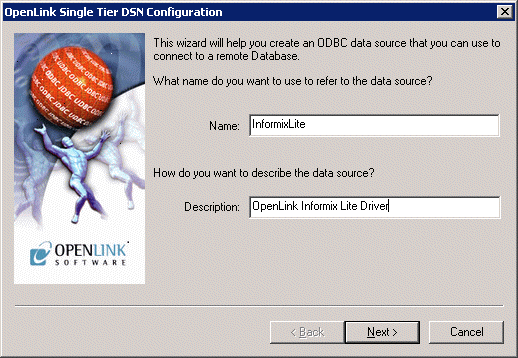
Informix 9 - Connect
Figure5.14.Informix 9 - Connect tab
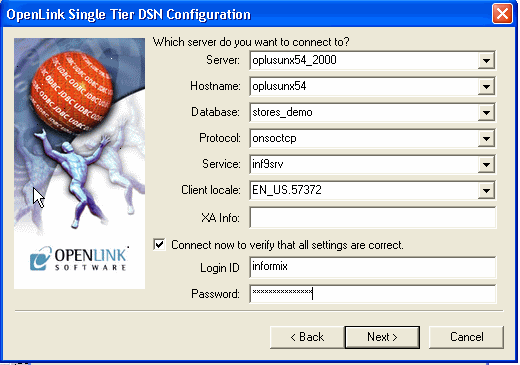
Enter details of the Informix server.
-
Server. The name of the Informix server that you want to communicate with.
-
Hostname. The network hostname of the machine hosting the Informix server.
-
Database. The name of the database on the server that you want to connect to.
-
Protocol. The informix network protocol identifier.
-
Service. The service name as configured in the winnt\system32\drivers\etc\services or windows\services file
-
Client Locale
Define the client locale. This takes the form:
[language_territory.]codeset[@modifier]
For example:
57371
                en_us.57372
                en_us.utf8@dict
An Informix 9 Lite driver should use UTF-8 as the codeset. The language and territory should not matter; so it should be possible, for example, to use French (fr_fr) or American English (en_us).
For Informix clients on Windows, the client locale is typically set through SetNet32. Rather than rely on the SetNet32 settings, our Lite driver instead sets the client locale at runtime.
It is possible to use a codeset number (Eg. 57372) rather than a codeset name (UTF8) to specify UTF-8 as the codeset. Either form can be used. The registry file included in an Informix client installation lists the supported code sets and the correspondence between codeset names and numbers.
The optional modifier has a maximum of four alphanumeric characters. This specification modifies the cultural-convention settings that the language and territory settings imply. The modifier usually indicates a special type of localized order that the locale supports. For example, you can set @modifier to specify dictionary or telephone book collation order.
-
Username & Password. If you enter the username and password here, and check the "Connect now" checkbox, proceeding to `Next>' will make a test connection to verify the above parameters.
-
XA Info. In the case of an OpenLink driver, this parameter is an ODBC Datasource Name (DSN): see the XA documentation for more about this.
Informix 9 Options
Figure5.15.Informix 9 Options tab
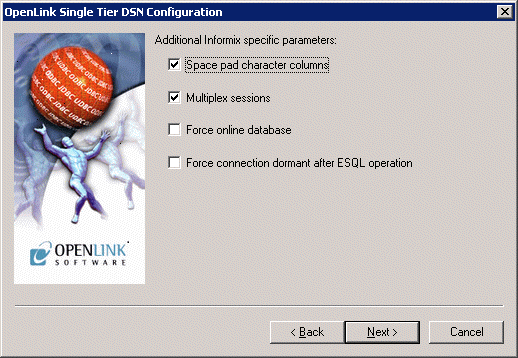
Enter options for the Informix connection:
-
Space Pad Character colums. If set, then colums are padded to full width by using the space character.
-
Multiplex Sessions. determine the connection parallelization mode.
-
Force Online Database. If set, then the database will always appear as online.